Showing posts with label talos. Show all posts

Saturday, March 16, 2019

TenFourFox FPR13 available

TenFourFox Feature Parity Release 13 final is now available for testing (downloads, hashes, release notes). I added Olga's minimp3 patch for correctness; otherwise, there are no additional changes except for several security updates and to refresh the certificate and TLD stores. As usual it will go live Monday evening Pacific time assuming no difficulties.

I have three main updates in mind for TenFourFox FPR14: expanding FPR13's new AppleScript support to allow injecting JavaScript into pages (so that you can drive a web page by manipulating the DOM elements within it instead of having to rely on screen coordinates and sending UI events), adding Olga's ffmpeg framework to enable H.264 video support with a sidecar library (see the previous post for details on the scheme), and a possible solution to allow JavaScript async functions which actually might fix quite a number of presently non-working sites. I'm hopeful that combined with another parser hack this will be enough to restore Github functionality on TenFourFox, but no promises. Unfortunately, it doesn't address the infamous this is undefined problem that continues to plague a number of sites and I still have no good solution for that. These projects are decent-sized undertakings, so it's possible one or two might get pushed to FPR15. FPR14 is scheduled for May 14 with Firefox 67.

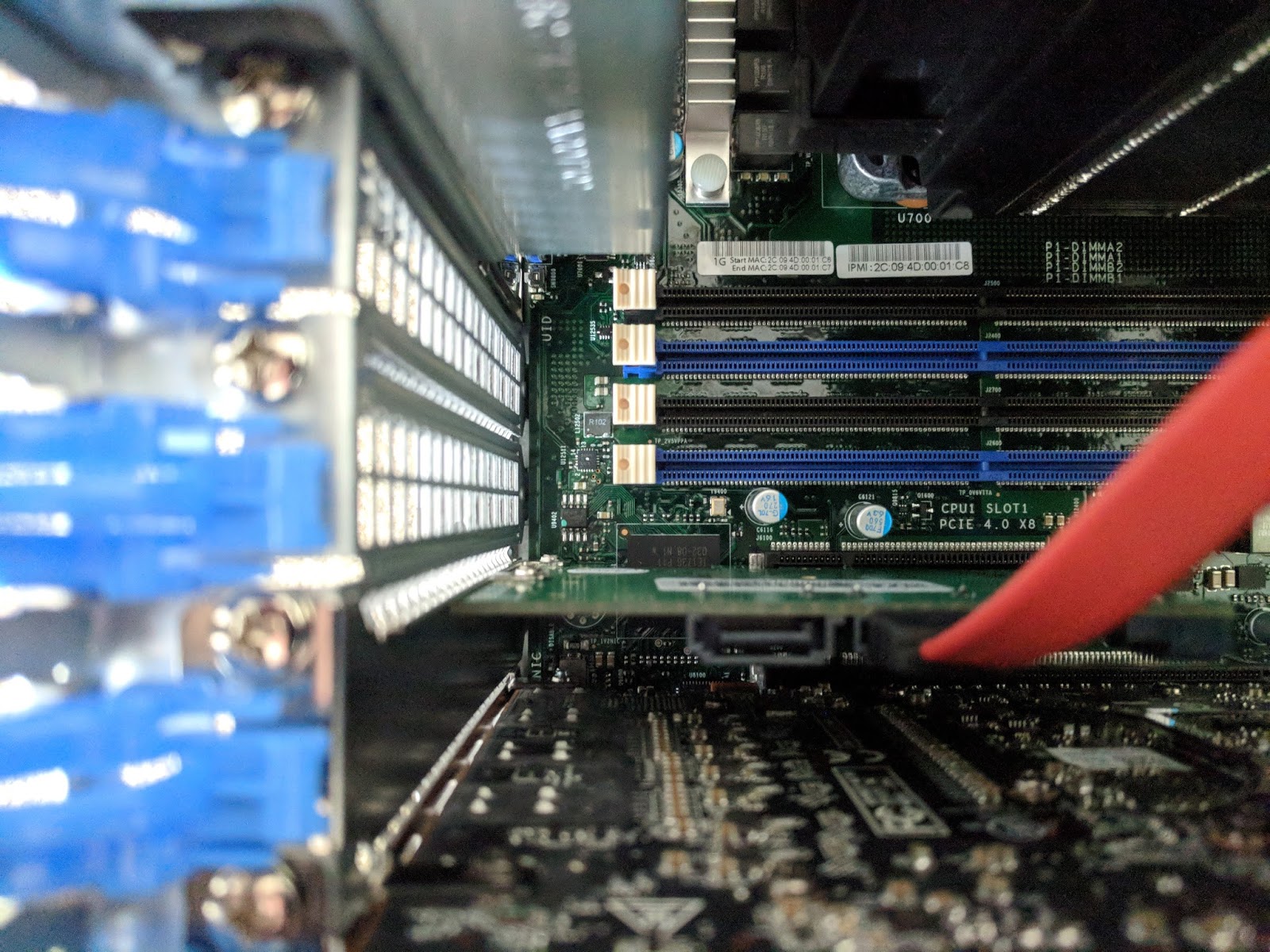
Meanwhile, I took a close look at the upcoming Raptor Blackbird at the So Cal Linux Expo 17. If the full big Talos II I'm typing this on is still more green than you can dream, the smaller Blackbird may be just your size to get a good-performing 64-bit Power system free of the lurking horrors in modern PCs at a better price. Check out some detailed board pics of the prototype and other shots of the expo on Talospace. If you're still not ready to jump, I'll be reviewing mine when it arrives hopefully later this spring.

Friday, January 25, 2019

TenFourFox FPR12 available

TenFourFox Feature Parity Release 12 final is now available for testing (downloads, hashes, release notes). There are no additional changes except for one outstanding security update and to refresh the certificate and TLD stores. As usual it will go live Monday evening Pacific time assuming no difficulties.

For "lucky" FPR13 I want to take a whack at solving issue 541, since my ability to work on Github from the G5 is seriously impaired at the moment (I have to resort to various workarounds or do tasks from the Talos II with regular Firefox). Since this has some substantial regression risk it will probably be the only JavaScript change I do for that release pending further feasibility tests on the whole enchilada. However, a couple people have asked again about AppleScript support and there is an old patch around that I think could be dusted off and made to work. That release is scheduled for March 19.

Speaking of the Talos II, I should be getting my second POWER9 system in soon, a 4-core Raptor Blackbird we'll be using as a media system. I've already got the mATX case picked out and some decent peripherals and it will probably run Fedora also, since I'm pretty accustomed to it by now. If these systems are starting to interest you but the sticker shock of a full T2 loadout is too much, the Blackbird can give you a taste of next-generation Power ISA without too much pain to your pocketbook.

Meanwhile, over on our sister Talospace blog, if you've been thinking about the Linux plunge (either with a POWER9 or on your own system) but your Mac habits die hard, here's a better way to get the Command key to work properly than faffing about with AutoKey and you can still run Mac OS X apps in virtualization or emulation.

Sunday, November 11, 2018

ICYMI: what's new on Talospace

In the shameless plug category, in case you missed them, two original articles on Talospace, our sister blog: making your Talos II into an IBM pSeries (yes, you can run AIX on a Talos II with Linux KVM), and roadgeeking with the Talos II (because the haters gotta hate and say POWER9 isn't desktop ready, which is just FUD FUD FUD).

Tuesday, October 30, 2018

The Space Grey Mac mini is too little, too late and too much

I've got a stack of G4 minis here, one of which will probably be repurposed to act as a network bridge with NetBSD, and a white C2D mini which is my 10.6 test machine. They were good boxes when I needed them and they still work great, but Apple to its great shame has really let the littlest Mac rot. Now we have the Space Grey mini, ignoring the disappointing and now almost mold-encrusted 2014 refresh which was one step forward and two steps back, starting at $800 with a quadcore i3, 8GB of memory and 128GB of SSD. The pictures on Ars Technica also show Apple's secret sauce T2 chip on-board.

If you really, really, really want an updated mini, well, here's your chance. But with all the delays in production and Apple's bizarrely variable loadouts over the years the mini almost doesn't matter anymore and the price isn't cheap Mac territory anymore either (remember that the first G4 Mac mini started at $500 in 2005 and people even complained that was too much). If you want low-end, then you're going to buy a NUC-type device or an ARM board and jam that into a tiny case, and you can do it for less unless you need a crapload of external storage (the four Thunderbolt 3 ports on the Space Grey mini are admittedly quite compelling). You can even go Power ISA if you want to: the "Tiny Talos" a/k/a Raptor Blackbird is just around the corner, with the same POWER9 goodness of the bigger T2 systems in a single socket and the (in fairness: unofficial) aim is to get it under $700. That's what I'm gonna buy. Heck, if I didn't have the objections I do to x86, I could probably buy a lot more off-the-shelf for $800 and get more out of it since I'm already transitioning to Linux at home anyway. Why would I bother with chaining myself to the sinking ship that is macOS when it's clear Apple's bottom line is all about iOS?

Don't get me wrong: I'm glad to see Apple at least make a token move to take their computer lines seriously and the upgrade, though horribly delayed and notable more for its tardiness than what's actually in it, is truly welcome. And it certainly would build optimism and some much-needed good faith for whatever the next Mac Pro is being more than vapourware. But I've moved on and while I like my old minis, this one wouldn't lure me back.

Friday, August 31, 2018

TenFourFox FPR9 available, and introducing Talospace

TenFourFox Feature Parity Release 9 final is now available (downloads, hashes, release notes). There are no changes from beta 3 except for outstanding security patches. Assuming no changes, it will go live Tuesday evening Pacific due to the US Labor Day holiday.

Allow me to also take the wraps off of Talospace, the new spin-off blog primarily oriented at the POWER9 Raptor Talos family of systems but will also be where I'll post general Power ISA and PowerPC items, refocusing this blog back to Power Macs specifically. Talospace is a combination of news bits, conjecture and original content "first person" items. For a period of time until it accumulates its own audience, I'll crosspost links here to seed original content (for the news pieces, you'll just have to read it or subscribe to the RSS feed).

As the first long-form article, read this two-part series on running Mac OS X under KVM-PPC (first part, second part). Upcoming: getting the damn Command key working "as you expect it" in Linux.

Sunday, August 12, 2018

TenFourFox FPR9b2 available

TenFourFox Feature Parity Release 9 beta 2 is now available (downloads, hashes, release notes). This version tightens up the geometry on the date/time pickers a little, adds some more hosts to basic adblock, fixes a rare but easily wallpapered crash bug and further tunes up hash tables using a small patch from Firefox 63 (!). I am looking at a new JavaScript issue which does not appear to be a regression, but I'd like to fix it anyway since it may affect other sites. However, I'm not sure if this is going to make FPR9 final, which is still scheduled on or about September 4 due to the American Labor Day holiday on the usual Monday.

The WiFi fix in beta 1 was actually to improve HTML5 geolocation accuracy, and Chris T has confirmed that it does, so that's been updated in the release notes. Don't worry, you are always asked before your location is sent to a site.

On the Talos II side, I've written an enhancement to KVMPPC allowing it to actually monkeypatch Mac OS X with an optimized bcopy in the commpage. By avoiding the overhead of emulating dcbz's behaviour on 32-bit PPC, this hack improves the T2's Geekbench score by almost 200 points in Tiger. Combined with another small routine to turn dcba hints into nops so they don't cause instruction faults, this greatly reduces stalls and watchdog tickles when running Mac apps in QEMU. I'll have a formal article on that with source code for the grubby proletariat shortly, plus a big surprise launch of something I've been working on very soon. Watch this space.

Sunday, June 3, 2018

Another weekend on the new computer (or, making the Talos II into the world's biggest Power Mac)

Your eyes do not deceive you -- this is QEMU running Tiger with full virtualization on the Talos II. For proof, look at my QEMU command line in the Terminal window. I've just turned my POWER9 into a G4.

Recall last entry that there was a problem using virtualization to run Power Mac operating systems on the T2 because the necessary KVM module, KVM-PR, doesn't load on bare-metal POWER9 systems (the T2 is PowerNV, so it's bare-metal). That means you'd have to run your Mac operating systems under pure emulation, which eked out something equivalent to a 1GHz G4 in System Profiler but was still a drag. With some minimal tweaks to KVM-PR, I was able to coax Tiger to start up under virtualization, increasing the apparent CPU speed to over 2GHz. Hardly a Quad G5, but that's the fastest Power Mac G4 you'll ever see with the fastest front-side bus on a G4 you'll ever see. Ever. Maximum effort.

The issue on POWER9 is actually a little more complex than I described it (thanks to Paul Mackerras at IBM OzLabs for pointing me in the right direction), so let me give you a little background first. To turn a virtual address into an actual real address, PowerPC and POWER processors prior to POWER9 exclusively used a hash table of page table entries (PTEs or HPTEs, depending on who's writing) to find the correct location in memory. The process in a simplified fashion is thus: given a virtual address, the processor translates it into a key for that block of memory using the segment lookaside buffer (SLB), and then hashes that key and part of the address to narrow it down to two page table entry groups (PTEGs), each containing eight PTEs. The processor then checks those 16 entries for a match. If it's there, it continues, or else it sends a page fault to the operating system to map the memory.

The first problem is that the format of HPTEs changed slightly in POWER9, so this needs to be accommodated if the host CPU does lookups of its own (it does in KVM-HV, but this was already converted for the new POWER9 and thus works already).

The bigger problem, though, is that hash tables can be complex to manage and in the worst case could require a lot of searches to map a page. POWER8 and earlier reduce this cost with the translation lookaside buffer (TLB), used to cache a PTE once it's found. However, the POWER9 has another option called the radix MMU. In this scheme (read the patent if you're bored), the SLB entry for that block of memory now has a radix page table pointer, or RPTP. The RPTP in turn points to a chain of hierarchical translation tables ("radix tree") that through a series of cascading lookups build the real address for that page of RAM. This is fast and flexible, and particularly well-suited to discontinuous tracts of addressing space. However, as an implementational detail, a guest operating system running in user mode (i.e., KVM-PR) on a radix host has limitations on so-called quadrant 3 (memory in the 0xc... range). This isn't a problem for a VM that can execute supervisor instructions (i.e., KVM-HV) because it can just remap as necessary, but KVM-HV can't emulate a G3 or G4 on a POWER9; only KVM-PR can do that.

Fortunately, the POWER9 still can support the HPT and turn the radix MMU off by booting the kernel with disable_radix. That gets around the second problem. As it turns out, the first problem actually isn't a problem for booting OS X on KVM once radix mode is off, assuming you hack the KVM-PR kernel module to handle a couple extra interrupt types and remove the lockout on POWER9. And here we are.(*)

Anyway, you lot will be wanting the Geekbench numbers, won't you? Such a competitive bunch, always demanding to know the score. Let's set two baselines. First, my trusty backup workstation, the 1GHz iMac G4: It's not very fast and it has no L3 cache, which makes it worse, but the arm is great, the form-factor has never been equaled, I love the screen and it fits very well on a desk. That gets a fairly weak 580 Geekbench (Geekbench 2.2 on 10.4, integer 693, floating point 581, memory 500, stream 347). For the second baseline, I'll use my trusty Quad G5, but I left it in Reduced power mode since that's how I normally run it. In Reduced, it gets a decent 1700 Geekbench (1907/2040/1002/1190).

First up, Geekbench with pure emulation (using the TCG JIT):

... aah, forget it. I wasn't going to wait all night for that. How about hacked KVM-PR?

Well, damn, son: 1733 (1849/2343/976/536). That's into the G5's range, at least with math performance, and the G5 did it with four threads while this poor thing only has one (QEMU's Power Mac emulation does not yet support SMP, even with KVM). Again, do remember that the G5 was intentionally being run gimped here: if it were going full blast, it would have blown the World's Baddest Power Mac G4 out of the water. But still, this is a decent showing for the T2 in "Mac mode" given all the other overhead that's going on, and the T2 is doing that while running Firefox with a buttload of tabs and lots of Terminal sessions and I think I was playing a movie or something in the background. I will note for the record that some of the numbers seem a bit suspect; although there may well be a performance delta between image compression and decompression, it shouldn't be this different and it would more likely be in the other direction. Likewise, the poor showing for the standard library memory work might be syscall overhead, which is plausible, but that doesn't explain why a copy is faster than a simple write. Regardless, that's heaps better than the emulated CPU which wouldn't have finished even by the time I went to dinner.

The other nice thing is that KVM-PR-Hacky-McHackface doesn't require any changes to QEMU to work, though the hack is pretty hacky. It is not sufficient to boot Mac OS 9; that causes the kernel module to err out with a failure in memory mapped I/O, which is probably because it actually does need the first problem to be fixed, and similarly I would expect Linux and NetBSD won't be happy either for the same reason (let alone nesting KVM-PR within them, which is allowed and even supported). Also, I/O performance in QEMU regardless of KVM is dismal. Even with my hacked KVM-PR, a raw disk image and rebuilding a stripped down QEMU with -O3 -mcpu=power9, disk and network throughput are quite slow and it's even worse if there are lots of graphics updates occurring simultaneously, such as installing Mac OS X with the on-screen Aqua progress bar. Minimizing such windows helps, but only when you're able to do so, of course. More ominously I'll get occasional soft lockouts in the kernel (though everything keeps running), usually if it's doing heavy disk access, and it acts very strangely with stuff that messes with the hardware such as system updates. For that reason I let Software Update run in emulated mode so that if a bug occurred during the installation, it wouldn't completely hose everything and make the disk image unbootable (which did, in fact, happen the first time I tried to upgrade to 10.4.11). Another unrelated annoyance is that QEMU's emulated video card doesn't offer 16:9 resolutions, which is inconvenient on this 1920x1080 display. I could probably hack that in later.

QEMU also has its own bugs, of course; support for running OS 9/OS X is very much still a work in progress. For example, you'll notice there are no screenshots of the T2 running TenFourFox. That's because it can't. I installed the G3 version and tried running it in QEMU+KVM-PR, and TenFourFox crashed with an illegal instruction fault. So I tried starting it in safe mode on the assumption the JIT was making it unsteady, which seemed to work when it gave me the safe mode window, but then when I tried to start the full browser still crashed with an illegal instruction fault (in a different place). At that point I assumed it was a bug in KVM-PR and tried starting it in pure emulation. This time, TenFourFox crashed the entire emulator (which exited with an illegal instruction fault). I think we can safely conclude that this is a bug in QEMU. I haven't even tried running Classic on it yet; I'm almost afraid to.

Still, this means my T2 is a lot further along at being able to run my Power Mac software. It also means I need to go through and reprogram all my AutoKey remappings to not remap the Command-key combinations when I'm actually in QEMU. That's a pain, but worth it. If enough people are interested in playing with this, I'll go post the diff in a gist on new Microsoft Visual GitHub, but remember it will rock your socks, taint your kernel, (possibly) crash your computer and (definitely) slap yo mama. You'll also need to apply it as a patch to the source code for your current kernel, whatever it is, as I will not post binaries to make you do it your own bad and irresponsible self, but you won't have to wait long as the T2 will build the Linux kernel from scratch and all its relevant modules in about 20 minutes at -j24. Now we're playing with POWER!

What else did I learn this weekend?

  • If you want disable_radix to stick on bootup, just put it in a grub config and Petitboot will pick it up. This is particularly helpful because I still can't figure out what I should be putting in BOOTKERNFW to enable the Radeon card, so Petitboot still comes up with a blank screen unless I pull the VGA disable jumper.

  • amdgpu is still glitchy sometimes. Trying to view very large images in Eye of GNOME actually caused graphics corruption and garbled the mouse pointer. The session quickly became unusable and I had to bail out and restart X11. Viewnior substituted nicely and doesn't have this problem. (I also found it with Hugin when I was trying to find something to view the equirectangular panoramas taken with my Ricoh Theta cameras. Eventually I hacked FreePV into building and that substitutes nicely as well. I gave it an entry in /usr/share/applications so that I could directly view images from the GNOME file manager.)

  • Symlinking xdg-open to open means I can still open most things from the command line with the same OS X command.

  • I had a dickens of a time getting my Android Pixel XL to talk to the T2. GNOME kept throwing MTP errors when it tried to mount it (yes, the phone was in MTP mode). gphoto2 could list the directories in PTP mode, but couldn't actually transfer anything. Even adb shell would disconnect after just a few commands, and adb pull wouldn't even get past enumerating the file list. Eventually I found some apocryphal note that someone fixed their phone by connecting it over USB 2.0 instead of USB 3.0, so I found a USB 2.0 hub, plugged that in, and plugged the Pixel XL into that. Now it works. (The same cable works fine at USB 3.0 speeds on my MacBook Air with the Pixel, so I am assuming this is an issue with the chipset in the T2. But I also think that's Google's bug, not Raptor's or Fedora's.)

  • The freely distributable Linux fonts are improving but still suck, so I transferred my entire font folder over AFP from the G5. The OTF and TTF fonts worked immediately, and Fondu easily converted the DFONT fonts, but I also have a lot of old Mac fonts and even some font suitcases that are pure resource forks. GNOME doesn't know how to transfer those. I could have tried copying them to a FAT volume and extracting the resource forks from the hidden directory, but that seemed icky. After some thought, I went to the Terminal on the G5 and did this instead:

    ls | fgrep -vi '.ttf' | fgrep -vi '.otf' | fgrep -vi '.dfont' | fgrep -vi '.bmap' | perl -ne 'chomp;print"\"$_\"\n"' | xargs -n 1 -I '{}' macbinconv -mac '{}' -mb '/home/spectre/rfont/{}.bin'

    The little snippet of Perl there preserves embedded spaces in the filenames. When I ran it, it turned all the font resources into MacBinary, I transferred the resulting files to the T2, and Fondu converted them as well. Now I have my fonts.

  • Speaking of fonts, I wanted to play with font hinting on an individual font basis and installed Fonts Tweaks for GNOME to do this. I started with my converted Lucida Grande that I use for most of the display theme, and it eliminated the anti-aliasing and made much of the display painfully jaggy. I couldn't for the life of me figure out how to undo it, even after uninstalling Fonts Tweaks, until I found .config/fontconfig/conf.d/ and removed the offending entry.

  • I was able to get my RadioSHARK to play audio, but it required a little setup first. I first had to compile the shark tool for Linux, which fortunately I had preserved as part of radioSH. That worked with little adjustment, but the new tool kept throwing permissions errors and I didn't really want to run it as root. The problem is that it uses libhid to talk to the HID portion of the RadioSHARK and libhid expects to be able to enumerate any USB device it encounters to see if it's really a HID. Eventually I hit on this udev recipe and added myself to a new usb group:

    SUBSYSTEM=="usb", GROUP="usb", MODE="0660"

    Now shark can control it, and I can listen in VLC (using a URL like pulse://alsa_input.usb-Griffin_Technology__Inc._RadioSHARK-00.analog-stereo).

  • Deadpool 2 is pretty funny. Not as good as the first, because there was no way it was going to out-outrageous it, and the gags were a little forced sometimes, but Brolin made a solid Cable and Domino was outstanding. And hey, a Kiwi kid who can act and isn't stereotyped! I even recognized them driving along the Crowsnest Highway (BC 3) near Manning Park before the merge with Trans-Canada 1 in Hope, a beautiful road I have driven many times myself. Plus, the mid-credits scenes made up for all of the movie's holes (he said, carefully avoiding the joke), and be sure to stay put for a musical laugh-out-loud moment at the very end!
Back on the G5 tomorrow for more work on date-time pickers for TenFourFox FPR8. I've abandoned CSS grid again for the time being because my current implementation is actually worse than not trying to render it at all. That's discouraging, but at least it gracefully degrades.

(*) Given that no changes were made to the HPTE format to get KVM-PR to work for OS X, it may not even be necessary to run the kernel with radix mode off. I'll try that this coming weekend at some point.

Monday, May 28, 2018

A weekend on the new computer (or, introducing "TenNineFox")

This Memorial Day weekend I pulled the Sonnet FireWire card from my Quad G5 and put it to sleep. I mean, I put it in sleep mode, and sat down with the Talos II to see if I could get Firefox building and running, and then QEMU (and to see if the G5 would stay asleep for more than a few hours, since I don't need a hot and noisy 230+ watt computer running next to my less hot but noisier 180W one). One glitch with this was switching the KVM away from the G5 caused it to wake up again, so I wrote a little Perl script to fork and log me out, and in the child process run a trivial AppleScript to tell application "Finder" to sleep. Then I could just run that from a remote login session from the T2, and the G5 would peacefully rest at about 20 watts or so.

First was to grab all the updates. This fixed amdgpu for X11 and now I'm running a fully accelerated GNOME desktop on the AMD Radeon Pro WX 7100. I got Sabrent Bluetooth and USB audio dongles, which "just worked" with Linux, and even got VLC to play some Blu-ray movies (as well as VLC can play them, given that BD+ is still not a solved problem). The T2 firmware update to 1.04 also diminished some of the fan hunting I was hearing and while it's still louder than the G5, it's definitely getting better and better. I'm thinking of getting one of the Supermicro "superquiet" PSUs next, since I notice its higher-pitch fan sound more than the case fans. The only hardware glitch still left over is that I can't figure out why Linux won't recognize the Sonnet FireWire/USB PCIe combo card. It should work, the chipsets should be supported. More on that later.

Next was to get working on builds. After most of Saturday spent hacking on it, I'm pleased to note that Firefox 60 will compile on the T2 with a minimal .mozconfig if you apply this patch, this patch and this patch, and chmod -x /usr/bin/ld.gold because the Firefox build system insists, nay, demands to use the (useless on PowerPC) gold linker; I don't even know why Fedora bothers installing it. You also need to turn jemalloc off because it barfs on the default PPC64 page size of 64K. The official Fedora 28 build of Firefox 60, which actually does work, apparently cheats a little by disabling tests and WebRTC, part of what those patches address, though I'm uncertain how they got around the jemalloc or WASM signal handlers issue. It runs fully multiprocess and I'm looking at enabling WebGL next. Even though JavaScript in Firefox 60 on the T2 is about twice as slow as the G5 in TenFourFox FPR7 (remember, no JIT), everything else is tremendously faster due to the 32 threads (8 cores, SMT-4 each), the monstrous cache and the 3+ GHz clock speed, so you really only notice it's not quite as fast as it ought to be on pages with a lot of scripts. So imagine what it will be like when I get the POWER9 JIT, I mean, nothing! I said nothing! Pay no attention to the man behind the curtain! If you build Firefox with -O3 -mcpu=power9, you get about a 3-5% speed boost over the -O2 mcpu=power8 Fedora build, which is worth it because it only takes the Talos 20 minutes to build Firefox at -j24 (compared to 3.5 hours with the Quad G5 in Highest performance mode roaring away at -j3). For posterity, here is the .mozconfig I'm currently using, which I intend to refine further:

mk_add_options MOZ_MAKE_FLAGS="-j24"
ac_add_options --enable-application=browser
ac_add_options --enable-optimize="-O3 -mcpu=power9"
ac_add_options --disable-jemalloc

You may call this the first build of "TenNineFox" if you like. :) Some mochitests fail which I'm investigating, but the test suite can run. By the way, Firefox Containers is awesome. I like to segregate my higher-security items like billpay and banking from the browser, which I use a TenFourFoxBox for on the G5, but with a Container it's integrated into the same browser instance and still keeps the cookies and data separate. Cool stuff.

On to QEMU. QEMU will build relatively uneventfully from source, or you can pre-install the Fedora package if you're lazy. Using the generic Power Mac profile mac99 both MacOS 9.1 and 10.4 start up largely happily under qemu-system-ppc, though there is an odd glitch with 9.1 where I have to quadruple-click on anything to get it detected as a double-click. However, while it was certainly useable, it didn't feel very fast. The System Profiler within the emulated Tiger instance said it was a "1GHz G4" with a "400MHz FSB." This seemed low, and the reason it is was ... drumroll please ... it was running with CPU emulation.

After some checking, I confirmed KVM was indeed installed on this system, so I tried running a 64-bit guest with qemu-system-ppc64 emulating an IBM pSeries machine with KVM-HV. That started up and ran at a nice clip, noticeably faster when I turned on KVM, so I tried to run the 32-bit guest with KVM-PR (which ought to emulate the proper CPU) and got an error message. Even the 64-bit guest that ran just dandy with KVM-HV wouldn't run with KVM-PR. Some digging determined that the KVM-PR kernel module existed, but did not load. Some more digging turned up that KVM-PR wouldn't load with modprobe. Even more digging turned up that ... KVM-PR doesn't run on bare-metal POWER9 yet, and unfortunately all PowerNV machines like the T2 are bare-metal.

This is a bummer, but it sounds like an eventually solveable problem. In the meantime, QEMU's performance as a Power Mac emulator is currently acceptable on the T2, just unspectacular. I'll be setting up an install of OS 9 to start with and getting some of my old software loaded into a workspace, and possibly hacking QEMU to autorelease the mouse and switch workspaces with a key combination so I can just jump back and forth easily. When the issues with KVM-PR are ironed out, then everything should "just work," just faster.

For yuks, I tried installing a couple earlier emulation efforts. SheepShaver is the one most people know, and it will compile (if you update config.{guess,sub} and tell configure to use the PowerPC emulator; it will not run natively), but it will not start. Even with sudo sysctl vm.mmap_min_addr=0 and sudo setsebool -P mmap_low_allowed 1 to get the kernel and SELinux to allow its unusual memory mapping requirements, it threw an error message saying it could not allocate enough memory and unceremoniously aborted. On a 32GB system trying to emulate a 256MB Mac a low-memory state seemed unlikely, so I'm guessing this may be a 64-bit bug. I then tried the other well-known Power Mac emulator, PearPC. This also required a new autoconf and a number of hacks to get it to build with current releases of gcc, but it does work, and it does start, and it's even worse, about 20% the speed of QEMU. The reason for this is that QEMU actually has a trivial JIT (TCG), while PearPC is a strict interpreter on systems that don't have JIT support, so while you could do stuff it felt like a 601 was running it instead.

The other parts of the weekend was figuring out what I needed to port over, and how to make the Talos happy on my highly Mac-centric network. Installing gvfs-afp and hfsplus-tools was easy and got the T2 talking to the G4 file server running 10.4.11. I don't like the Linux font set much, so I'll be copying my font folder from the G5 over and converting things with Fondu as necessary. VLC will play CDs, but I will probably try to port my command-line player since it's easier for me to manipulate. I also need to move my Quake PAKs and Doom WADs over, because everyone needs a coffee break now and then, and finally get my Pixel XL to backup its photos to it. I also added even more Mac key combinations to AutoKey to maintain my Mac command-key muscle memory.

Anyway, after I've submitted this post I'll power down the Talos tonight and wake the G5 back up again tomorrow to continue work on TenFourFox FPR8, having slept peacefully and properly over the entire holiday weekend. Now that same-site cookies are working, it's time to get some sort of basic CSS grid support operational (or at least whitelisted for those sites that need it), and I still want to finish idle callback support and date-time picker support. After all, even though the T2 is getting closer and closer to being suitable as my main computer, there's still a lot I'll need to keep the G5 around for, so I'm certainly not planning to get rid of it. Or, you know, "put it to sleep" in the veterinary sense. Just because it's old doesn't mean it's useless.

Monday, May 21, 2018

Spectre Number 4, STEP RIGHT UP!

Updated based on IBM's documentation.

In the continuing saga of Meltdown and Spectre (tl;dr: G4/7400, G3 and likely earlier 60x PowerPCs don't seem vulnerable at all; G4/7450 and G5 are so far affected by Spectre while Meltdown has not been confirmed, but IBM documentation implies "big" POWER4 and up are vulnerable to both) is now Spectre variant 4. In this variant, the fundamental issue of getting the CPU to speculatively execute code it mistakenly predicts will be executed and observing the effects on cache timing is still present, but here the trick has to do with executing a downstream memory load operation speculatively before other store operations that the CPU (wrongly) believes the load does not depend on. The processor will faithfully revert the stores and the register load when the mispredict is discovered, but the loaded address will remain in the L1 cache and be observable through means similar to those in other Spectre-type attacks.

The G5, POWER4 and up are so aggressively out of order with memory accesses that they are almost certainly vulnerable. In an earlier version of this post, I didn't think the G3 and 7400 were vulnerable (as they don't appear to be to other Spectre variants), but after some poring over IBM's technical documentation I now believe with some careful coding it could be possible -- just not very probable. The details have to do with the G3 (and 7400)'s Load-Store Unit, or LSU, which is responsible for reading and writing memory. Unless a synchronizing instruction intervenes, up to one load instruction can execute ahead of a store, which makes the attack theoretically possible. However, the G3 and 7400 cannot reorder multiple stores in this fashion, and because only a maximum of two instructions may be dispatched to the LSU at any time (in practice less since those two instructions are spread across all of the processor's execution units), the victim load and the confounding store must be located immediately together or have no LSU-issued instructions between them. Even then, reliably ensuring that both instructions get dispatched in such a way that the CPU will reorder them in the (attacker-)desired order wouldn't be trivial.

The 7450, as with other Spectre variants, makes the attack a bit easier. It can dispatch up to four instructions to its execution units, which makes the attack more feasible because there is more theoretical flexibility on where the victim load can be located downstream (especially if all four instructions go to its LSU). However, it too can execute at most just one load instruction ahead of a store, and it cannot reorder stores either.

That said, as a practical matter, Spectre in any variant (including this one) is only a viable attack vector on Power Macs through native applications, which have far more effective methods of pwning your Power Mac at their disposal than an intermittently successful attempt to read memory. Although TenFourFox has a JavaScript JIT, no 7450 and probably not even the Quad is fast enough to obtain enough of a memory timing delta to make the attack functional (let alone reliable), and we disabled the high-resolution timers necessary for the exploit "way back" in FPR5 anyway. The new variant 4 is a bigger issue for Talos II owners like myself because such an attack is possible and feasible on the POWER9, but we can confidently expect that there will be patches from IBM and Raptor to address it soon.

Wednesday, May 16, 2018

A little Talos of your very own

I haven't had as much time to work on getting QEMU and Firefox functional/useable on the Talos II over the last few days because of work complications (I'll be reporting on that in a few weeks), but Raptor has heard those of you who are still suffering sticker PTSD from the Talos II and announced the Talos II Lite.

Yes, think of it as the Mac mini G4 to the Talos II's Quad G5. This comparison is not completely inappropriate because the T2L has only one CPU socket (the T2 has two) and thus only 24 PCIe lanes, split amongst an x16 and an x8 (the T2 fully loaded has two x8s and three x16s), and "only" 8 DDR4 slots (the T2 has 16). You can still cram one of the 22-core demons into one of those, though. Starting price is "just" $1399.99, though as with the Talos II the CPU is extra ($375 for 4-core to $2575 for 22-core), the RAM is extra ($255 for 16GB to $2950 for 128GB), and the storage is extra (Microsemi SAS starts at $300 plus drives, or a Samsung 960 EVO NVMe 500GB for $350, or a four-port SATA controller for $50 plus drives). You can also add the same Radeon WX 7100 workstation card that's in the big T2 ($800), too, or just use the same onboard VGA controller that comes with the T2 (built-in). It has USB 3.0 and dual Gig Ethernet, just like the big fella, though it doesn't seem to come with a BD-ROM.

However, the mini:Quad analogy falls down when you look at the actual size of the Lite. It, too, is an EATX behemoth, despite the leaner spec. Personally I would have hoped for something a little more manageably dimensioned. Raptor is taking about offering a smaller board but that would require a redesign and this was probably an artifact of getting it launched cheap(er)ly.

So would I have saved money with my T2 going Lite? Let's price it out: $1400 for the system (includes 500W PSU and EATX case), $595 for the octocore POWER9 (my T2 has two 4-core chips), $535 for 32GB ECC DDR4 RAM, $350 for the SAS card, $800 for the AMD Radeon WX 7100, $50 for the 4-port SATA card (this came installed "free" in my T2) and $350 for the 500GB Samsung NVMe SSD. Sticker price for that configuration is $4080 plus applicable tax and shipping; I repriced the same configuration for the Talos II and got a sticker cost of $7360, about $250 more than what I paid personally (the benefit of being an early adopter), so let's say a cost difference of $3300. That's substantial and a whole lot more palatable. $4080 is actually within Quad G5 range -- I paid not much less than that for my Quad G5 back in the day with the 7800GT and 8GB of RAM. A cheap SATA DVD-RW or something wouldn't add much more to the price if you want an optical drive.

There's a small problem here though: the Lite can't actually accommodate that loadout because there's not enough PCIe slots to get it all in there. In fact, I've got another 1GB NVMe drive to install in my T2, and I'm probably going to pull the now unused Sonnet FireWire/USB PCIe card (I prefer FireWire hubs) from the G5 to install in it too, which may mean temporarily pulling the SAS card until I'm ready to populate the front bays. Also, the Talos II out of the box doesn't support PCIe bifurcation, so I really do need both those slots for my SSDs. Per Raptor it can: with changes to the machine XML definition it could be made to "trifurcate" the x16 endpoint on slot 3 (CPU 2, PHB2) into an x8 and two x4, but that would mean that the available 4-way M.2 NVMe multicards would only have at most three slots available, and the system doesn't ship that way anyhow. Besides, even if you did get bifurcation working on the Lite, you'd only have the remaining x8 for anything else which couldn't be used for an x16 workstation video card. UPDATE: Per Raptor, the Lite's x16 can't be bifurcated due to a hardware limitation, so that is only an option for the big system.

But let's say you're not a maniac like me and you want a basic "budget" config. Let's drop the workstation card and the SAS card, and drop to a 4-core with 16GB, and we have a $2430 system. Wow! Not bad! You've still got the NVMe card and storage expansion over SATA, and you've still got USB ports for audio and the onboard VGA. But you've used up all your PCIe slots, so let's hope you don't need anything else to go internal (let alone 3D acceleration). If you really want that x16 slot back, drop the NVMe card and add some SATA drives ($2080 + devices), but now you're starting to strip this system down more than you might like to, and it doesn't get much cheaper that way.

Overall, that $3300 really does translate into greatly improved expandability in addition to the beefier power supplies, and thus it was never really an option for my needs personally. Maybe my mini:Quad analogy wasn't so off base. But if you want to join the POWER9 revolution on a budget and give Chipzilla the finger, as all right-thinking nerds should, you've now got an option that only requires passing a kidneystone of just half the size or less. It ships starting in July.

Another interesting thing Raptor pointed out: in the Phoronix performance tests, the Talos was running with full Spectre and Meltdown protections, but the x86 wasn't! Boooo! And if you really want to turn Spectre protections off on the Talos for even more grunty, you can do that. Meanwhile, as we speak, Intel is making people take down their firmware documentation and trying to stymie efforts to reverse engineer them. What system would you rather support?

Wednesday, May 2, 2018

A semi-review of the Raptor Talos II

After several days of messing with firmware and a number of false starts, the Talos II is now a functioning member of the Floodgap internal network. It's under my desk with my other main daily drivers (my Quad G5, MDD G4, SGI Fuel and DEC Alpha 164LX) and shares a KVM. Thanks to the diligent folks at Raptor, who incredibly responded to my late night messages at 2am Pacific, the fans are now much more manageable and I'm able to get proper video output from the Radeon WX 7100 (though more on that in a minute). As proof of its functionality, I'm typing this blogpost on the Talos instead of on the G5. Here it is in its new home:

I'll call this a "semi-review" because, well, the system is a work in progress and getting the most from it will take time. Relatively little is optimized for PowerPC these days, and even less still for little-endian PowerPC or POWER9 in particular. If you want performance benchmarks, you can read Phoronix's performance tests which are substantially more thorough than anything I could gin up. This is about my experiences with the unit now that I've been using it most of today with my early firmware issues now largely corrected.

For what's in it, see my unboxing photographs from a few days ago. This system is best described as a middle-road configuration now that the 22-core chips are becoming available. It contains two four-core Sforza POWER9 processors on a 14nm process at 3.2/3.8GHz with 512K of L2 and 10MB of L3 per core; there is a discrepancy with the wiki which says 3.1/3.7 but you can read Raptor's spec sheet. SMT is available. By having both processors installed, all of the PCIe slots in this machine are unlocked (this was a deliberate design decision for efficiency, not to make you buy hardware you didn't need). All of the options in this unit are factory-installed: 32GB of ECC DDR4 RAM (maximum 2TB), an AMD Radeon Pro WX 7100 workstation video card (roughly a hopped-up RX 480), a Samsung 960 EVO 500GB NVMe SSD on a PCIe card and a Microsemi PM8068 SAS 3.0 controller. The machine comes stock in a Supermicro CSE-747 EATX case with two redundant 1400W power supplies, a SATA controller, onboard VGA, onboard USB 3.0, onboard 2xGigE network ports (Broadcom BCM95719), onboard RS-232 serial and an LG Blu-ray drive. A recovery disc with the factory firmware and manual is included. Sticker price was approximately US$7200.

No operating system is installed except for Petitboot (more in a moment). This machine should eventually run anything that supports it (of course it will run NetBSD, at least someday), but your sole option right now is Linux, and bleeding edge Linux at that: Raptor's excellent tech support team tells me that kernel 4.13 is minimally required and 4.16 is strongly recommended. This greatly limits your choices out of the box especially if you don't already have another Linux system to support bringing this one up. I didn't, so I selected Fedora 28, which supports ppc64le and has kernel 4.16. As of this writing, the final release of 28 has just hit the streets, so that's very timely. Officially Fedora only supports the Server flavour on ppc64le, but we can convert that to a Workstation version after it's installed.

The system boot sequence has several stages. You can read about them in a bit more detail on the RCS Wiki, but the breakdown is not unlike that of a modern POWER server, since this is mostly a modified OpenPOWER design. Immediately when power is applied, the system boots the "BMC" Baseboard Management Controller, which runs on an ARM6L service processor. This sits idle when the main processors are powered down. When the power button is pressed, the BMC starts the Initial Program Load (IPL) process on the main POWER9 CPUs from PNOR flash. Through a complex six-stage process the IPL terminates with loading Petitboot, a simple loader inside a tiny Linux environment called Skiroot. Since Petitboot is running in a tiny Linux, its presence simplifies driver support for the main operating system by handling platform functionality directly via the OpenPOWER Abstraction Layer. Petitboot, in turn, kexec()s into the OS kernel and, at least in theory, away you go.

Initially the fans came on at IPL at a terrific volume such that my wife and I could not reliably hold a conversation in the same room (no exaggeration). In addition, while I could get Petitboot to display on the Radeon card, the operating system wouldn't appear -- I had to use the onboard VGA to boot, which was inconvenient for my KVM and meant my expensive workstation card was doing nothing. Raptor's tech guys listened to my frustrated pleas and notified me immediately when the most current firmware was available. When I loaded this firmware on the system, it worked beautifully for about 10 or 15 minutes and then started freaking out, failing to see the NVMe, kernel panicking on the Fedora disc that it used to boot from, etc. Raptor got me another command to blank the GUARD partition on the PNOR flash to try to reset it, and the machine started working! In fact, I've been using it since about 11am today non-stop, so I consider that to be an excellent burn-in period. Oddly, I can't get Petitboot to appear on the WX 7100 output now, but the OS does, so it's not a big deal (I can just switch to VGA if I need to get into the bootloader until that gets fixed). This all happened literally within the space of a few days. The fans rev up and down periodically, which can be a bit disconcerting next to my usually quiet Quad G5, but they are no longer anywhere near as shrill or constant and I only notice them if the room is warm.

Power usage, incredibly, is quite modest for a machine of this specification. When you connect the power, the BMC sits idle at around 13W with a very quiet fan running. Starting IPL, the fans do still come on full blast at least initially and power usage jumps immediately to 143W. This climbs slowly to 212W by the time you hear the beep from the system indicating Petitboot has started. Petitboot then starts Fedora and once Fedora has booted and we are at the login screen, power usage drops back to around 150W and the fans automatically throttle down. I got out my infrared thermometer and checked the heat coming out the back, and found it was a very reasonable 91 to 99 degrees Fahrenheit. (The cat likes the G5 better for heat.) Most tasks barely moved the needle after that. I did some installations with dnf and the power usage barely rose to 160W. Compiling OpenSSL got it up to 177W. This is all less than the Quad G5 next to it, which right now is reading 238W on the UPS while sitting largely idle in Reduced power mode. On the other hand, I'm not using the video card very heavily, so this output could jump quite a bit once I get some games running on it. There are also no drives connected to the RAID yet, just the NVMe SSD.

You can expect an upgrade path with this hardware as well. Besides accepting any hardware accessories that are compatible with Linux (though see below), Raptor is planning to make additional processor options available if you have the thermal headspace and the power capacity, even this 22 core monster. Unlike the Quad G5, this system shouldn't be a dead end.

So that's the hardware. Let's talk about the software. This isn't under Raptor's control necessarily, but it will play into your decision-making process should you make an investment in one.

There are really two kinds of customers for the Talos II: people like me who dislike x86 on technical grounds and Intel's continued hegemony and wish to support alternative architectures of comparable performance, and people who are paranoid and want a system that is far less of an opaque closed system that they can audit and trust than what passes for commodity hardware these days. There is naturally some overlap between these two groups. The second group will probably put up with a little more inconvenience for the sake of ultimate privacy than the first group, which is more concerned about functionality. You should think long and hard about where you fall here, because it will affect how you perceive the system.

The major selling point to the second group is that the firmware is fully open-source and auditable even down to the FPGA level. Schematics are included! You can download and build your own FPGA flash image, your own BMC flash image and your own PNOR flash image. In fact, you are expected to, though Raptor provides pre-built versions assuming you trust them and their warrant canary. As long as you don't brick the BMC -- though this is doable if you are incautious -- you can play around with Petitboot and Skiboot pretty much at will and just reflash if you screw it up. Programming the FPGA means you'll need your own SPI programmer, but there's a JTAG port on the board and you can plug right in. Note that this scheme isn't perfect because you still have to trust a certain amount of the other firmware in the system, mostly in the various peripheral devices, but it's clearly better than what you'd get from any other system and it's a strong start towards reclaiming control of our own machines. Although I haven't tried writing my own custom firmware yet, it's very easy to build and flash the prefab releases, and the process is well documented. To upgrade to the current firmware from the v1.02 my machine came with did not require flashing the FPGA, so I could do it all from my G5 by talking to the BMC over SSH.

For the first group, however, that alone won't be satisfactory, because we actually want to use this thing as a computer. Frankly, my plan is to make this the Power Mac G5 successor that never was. It certainly has the specs for it. Unfortunately, this part is the bit that's not yet complete. I haven't tried other operating systems other than Fedora 28 yet, but I can't imagine the experience is much different, so take these observations at face value.

Because Fedora doesn't offer a direct download for Workstation on little-endian 64-bit PowerPC, you have to install Server first, and then switch to the Workstation environment. This will download the remaining missing pieces; I selected the default Workstation environment, which is based on GNOME. Hopefully future distros supporting this machine will do better than this process. While in use the system is perfectly responsive but seems slower than it ought to be at times, particularly compared to the Quad G5, though this is probably an unfair comparison. The G5 is running Mac OS X 10.4.11, an OS written by its manufacturer and highly optimized for it. The Talos II has to contend with an OS for which it is not the primary target, nor one that is particularly tuned for any PowerPC system.

There are various glitches and many things don't work yet. The first and most important deficiency is that I still can't get amdgpu working in Xorg, so I'm using framebuffer support (fbdev). This means the video card is still going largely underutilized. I expect this to improve as Polaris support improves, but it's not there yet. For this reason I haven't even bothered trying to load any games on it so far.

Multimedia is also limited because I don't have a sound device. lspci alleges the WX 7100 has some sort of audio support, but the open source drivers don't currently support it. I'll likely solve this problem with some sort of USB audio out in the meantime, but that's suboptimal. I haven't tried playing DVD or BD movies on it yet either for that reason.

Fedora didn't like the GBU-421 Bluetooth USB dongle I use with the G5. The G5 needed no drivers and it just "works," but GNOME doesn't see it. I had to transfer the picture above from my phone to the G5, and then to the Talos.

A few of the included applications either misbehave or don't work at all, though most fortunately do. The GNOME Software application kept complaining about incorrect checksums, but dnf was fine from the command line. Firefox 59 crashes with a segmentation fault on start-up (like I say, I guess I've got a project now). GNOME Web (formerly Epiphany) does work, but it's WebKit and I don't like that, and it too is not very well optimized. It does pretty well, though, considering; it got 2455ms on SunSpider, which would seem like a dismal number given that the Quad G5 managed 2255ms in TenFourFox, except that TenFourFox has a JIT and GNOME Web here is running interpreted, and TenFourFox is compiled with CPU optimizations specifically for the G5 while GNOME Web and the system WebKit have no specific optimizations. I'm also unhappy there's no Gopher support. On the other hand, you would expect YouTube videos to be a slideshow (no JIT, little or no SIMD), and yet they play at a surprisingly good framerate, just muted. This post is being written in GNOME Web.

However, much of the rest of it does work. Since I intend this to be a successor to my G5, I spent most of the afternoon making GNOME more Mac-like. Using Fondu, I copied the Lucida Grande font from Tiger and converted it back to TTF (to compile Fondu on the Talos, configure it with ./configure x86_64-unknown-linux-gnu, since it doesn't know what the heck a little-endian PowerPC is) and installed it. I then installed the GNOME Tweaks tool with dnf and a Mac GNOME theme and Dock extension. (Some other ideas are on this how-to.) I switched the system font to Lucida Grande in the Tweaks tool, disabled hinting entirely and left it with greyscale antialiasing, turned on User shell themes in Tweaks, and wrote a minimal shell theme to make the top bar more like a Mac menu bar. It's not perfect, but it's a good start. I'll provide it later if people are interested.

To get my Mac shortcut keys back, I installed AutoKey (autokey-gtk), and started making equivalents. A few clashed with GNOME, which I changed from Settings, and I altered a couple others in Terminal, but they mostly just worked with everything else including GNOME Web.

Let's bottom line it. As far as value for money, the machine is well-assembled, solidly built (if in an unexciting enclosure) and consists of quality components. I think the above paragraphs also demonstrate that the level of support from Raptor is absolutely commensurate with what you would expect for a $7000+ computer. Frankly, it's one of the best technical support experiences I've ever had with any system. Part of that is undoubtedly the low production numbers and highly technical engineering audience, but I have never felt like the machine was an unrecoverable doorstop even when it wasn't suitable for use yet.

Software, however, is still a work in progress. You should not expect a 100% functional system at the end and you don't even get a functional system out of the box. Not only will you have to install an OS and go through that process, you're also pretty much guaranteed that something won't work when that part is done. And even when everything you need actually is working, nothing is optimized for it; many things will run abnormally slowly until "someone" (tm) does this work. It's been a long time since PowerPC was a common desktop platform, so many of the optimizations Intel systems take for granted just don't exist, and some desktop apps aren't even tested.

But all of these things are correctable. The hardware is solid. The firmware rudiments are coming together; look at how quickly this machine evolved in just a few short days. Software is likely to be an easier nut to crack on the little-endian Talos than on previous big-endian PowerPC systems, too. Assuming there aren't dependencies on complex assembly code blocks, more code is likely to "just" work with fewer or no modifications because the assumptions made for mainstream x86 will now largely apply here as well. This depresses me personally since I think in big-endian, and have used big-endian systems for decades, but that's the way things are now.

I'm looking forward to this system becoming my daily driver and it might even happen in just a few months. I need to get Firefox working, and I need to get QEMU optimized to run my old Power Mac software. That's all doable. Once the video card and sound options are fixed, I can even start using it for multimedia and games, and the G5 can then become a well-cherished part of my collection.

This is a fully free system you can live with. This is a fully free system that can kick ass. The promise was kept and the dream is real. It's time to get busy.

Friday, April 27, 2018

Unboxing the Talos II: it's here!

UPDATE: Read a semi-review of the Raptor Talos II!

This post is being written in TenFourFox FPR7 beta 3. More about that in a day or two, because today a big container arrived at my P.O. box. I had to put the rear seats down to get it into my 2018 Honda Civic Si Sedan.

The Raptor Talos II (see my previous posts for more) arrives in an 80-pound box. It's a good thing I already had mesh put in for my hernia surgery because I needed it today, by golly. No complaints about the packaging as the unit came very well protected. Gorgeous wife unwillingly positioned for scale (she is 5'4"); the computer is lengthwise and rather longer than your typical tower system:

Inside the accessory box were the keys, footsies, extra header and SATA cables, the recovery DVD for the firmware (with manual), printed QR codes to get public keys for verification, power cables, and the parts removed from the case to install my BTO options described below.

The computer is in an otherwise off-the-shelf Supermicro CSE-747 (hah!) EATX chassis. It's kind of a boring look, but it does have 11 slots, 8 hard disk bays and two 5.25" bays. On the rear here are dual redundant 1400W (!) power supplies, an honest-to-goodness RS-232 serial port, two GigE ports (top is shared with the "Baseboard Management Controller" service processor), two rear USB 3.0 ports and a VGA video port.

But there is some special branding, though I wouldn't have minded some fun case graphics myself:

The chassis is lockable and has excellent ventilation, though the design isn't really all that interesting. I'm thinking of removing the front badge and then doing something like I did for my DEC Alpha 164LX.

An LG Blu-ray drive is included. Take that, Steve Jobs.

It's serial number 12! (I was order 8 originally, in August 2017.)

Well, let's crack it open. Remove the two retention screws from the rear of the case (I would have rather had thumbscrews here) and pop out and lift the side case lever to remove the side door, exposing the interior of the machine. I put the computer on its side here for these photographs.

This AMD Radeon Pro WX7100 is a factory-installed option ...

... as well as the Samsung 960 EVO NVMe storage unit and the Microsemi PM8068 SAS 3.0 controller. This will drive the front bay RAID. They are also BTO options.

This SATA controller connects to the optical drive. One of the four DIMM banks is visible. I had 32GB of ECC RAM factory-installed (as two 16GB sticks).

The Supermicro SAS747TQ backplane comes from the factory ready to go connected to the optional Microsemi. I'll be making a Fry's run soon to populate the front bays.

Yuuuuuuge processor heatsinks. You'll need a 5/32" hex driver (Raptor sells one, but my trusty Bondhus #13109 seems to work). They came pre-installed and visually inspected good. This unit has two four-core Sforza POWER9 CPUs at 3.1/3.7 GHz with 90W TDP.

It's even louder than the Quad G5 when it starts, if you can imagine that. The most current firmware supposedly addresses the fan volume but it's still intolerably loud especially compared to the G5 when it's idle. We'll see how it behaves once I get an operating system on it.

Up in Petitboot. No operating system is installed. That's your job!

Right now the firmware is up to date, though I would be remiss not to try to rebuild it from scratch at some point to personally audit it (since the NSA is probably all upin my bidness now for having purchased the thing). I was able to get into the BMC and talk to it from the G5 and all of the hardware seems to be in working order. However, I haven't had much success with actually booting it because I have and want to use my discrete AMD GPU, meaning I'll preferentially need to find a distro with Linux 4.16 or later. (I could use something earlier if I really wanted to, but it would require some jumping through hoops with a serial terminal that I don't really feel like doing right now.) Fedora 28 seems the best bet for getting something working, and then we can see where we're at as other distros catch up.

I'll post progress reports on the Talos as I actually make progress; I'm mostly just excited to finally have it in my hands. This is a heck of a system with quality parts, built to do real work, and my first impression is that the $7200 I dropped on it has gone to good use.

Meanwhile, more about FPR7b3 a little later this weekend. It's mostly a feature and tuneup release, all good stuff.

Saturday, April 14, 2018

TenFourFox FPR7b2 available

Despite being currently in the grip of my annual case of bronchitis, in which I sweat and secrete more foul cloudy phlegm than Jabba the Hutt, TenFourFox Feature Parity Release 7 beta 2 is now available for testing (downloads, hashes, release notes).

The reason for beta 2 was to fix a serious regression caused by issue 495. Since I was issuing a second beta anyway, I took the opportunity to make a few more fixes, including a glitch with image layout that manifested on the MorphOS site, fixing SourceForge's tendency to corrupt our pulldown menus with unrenderable icons, and adding support for TLS SHA-384 ciphers to fix an issue with HTTP/2 sites. There are also some security fixes for testing and instead of changing the fx shorthand UA template to Firefox 60, I just added a new fx60 one as well as a user agent for Internet Explorer 11. This means users whose sites incorrectly sniff them and are using the current Firefox 52 impersonation won't unexpectedly get Fx60 features enabled that the browser can't handle right now (this is particularly an issue for Gmail).

As a result, I'm going to rework the user agent support in TenFourFoxBox, meaning version 1.1 will not get an official release (I'll be going to 1.2). Yes, this will include allowing custom agent strings, though you'll need to do that from the command line. It will be left up at the old URL until the new one is completed.

Meanwhile, my excitement over the Talos systems finally shipping cannot be contained by my mucus. It looks like motherboard orders are being fulfilled and are already out in the public. The system depicted there, however, is not the Talos II as shipped. On the other hand, however, Phoronix actually did get access to a confirmed Talos II, pitted the POWER9 versus AMD Epyx Epyc and Intel Xeon, and came away very impressed. Especially when we consider that the software packages in question were in no way optimized for POWER9 (and are for x86_64), the Talos has very competitive performance even pitted against non-libre systems. I haven't heard that the full workstations are shipping yet, but given that the rest of the components are all off-the-shelf, it shouldn't take long.

2005 called, folks. They want their PowerPC performance jokes back.

Saturday, March 24, 2018

TenFourFox FPR7b1 and TenFourFoxBox 1.1 available

TenFourFox Feature Parity Release 7 beta 1 is now available for testing (downloads, hashes, release notes). I chose to push this out a little faster than usual since there are a few important upgrades and I won't have as much time to work on the browser over the next couple weeks, so you get to play with it early.

In this version, the hidden basic adblock feature introduced in FPR6 is now exposed in the TenFourFox preference pane:

It does not default to on, and won't ever do so, but it will reflect the state of what you set it to if you played around with it in FPR6. Logging, however, is not exposed in the UI. If you want that off (though it now defaults to off), you will still need to go into about:config and change tenfourfox.adblock.logging.enabled to false. The blocklist includes several more cryptominers, adblockerblockers and tracking scripts, and there are a couple more I am currently investigating which will either make FPR7 final or FPR8.

The other big change is some retuning to garbage and cycle collection intervals which should reduce the browser's choppiness and make GC pauses less frequent, more productive and more deterministic. I did a number of stress tests to make sure this would not bloat the browser or make it run out of memory, and I am fairly confident the parameters I settled on strike a good balance between performance and parsimoniousness. Along with these updates are some additional DOM and CSS features under the hood, additional HTTPS cipher support (fixing Amtrak in particular, among others) and some sundry performance boosts and microoptimizations. The user agent strings are also updated for Firefox 60 and current versions of iOS and Android.

To go along with this is an update to TenFourFoxBox which allows basic adblock to be enabled for foxboxes and updates the cloaked user agent string to Firefox 60. There is a new demo foxbox for 2048, just for fun, and updated Gmail and user guide foxboxes. TenFourFoxBox 1.1 will go live simultaneously with FPR7 final on or about May 9.

Meanwhile, the POWER9-based Talos II showed up in public; here's a nice picture of it at the OpenPOWER Summit running Unreal Engine with engineer Tim Pearson. I'm not in love with the case, but that's easily corrected. :) Word on the street is April for general availability. You'll hear about it here first.

Saturday, March 3, 2018

And now for something completely different: Make that Power Mac into a radio station (plus: the radioSHARK tank and AltiVec + LAME = awesome)

As I watch Law and Order reruns on my business trip, first, a couple followups. The big note is that it looks like Intel and some ARM cores aren't the only ones vulnerable to Meltdown; Raptor Computer Systems confirms that Meltdown affects at least POWER7 through POWER9 as well, and the Talos II has already been patched. It's not clear if this is true for POWER4 (which would include the G5) through POWER6 as these processor generations have substantial microarchitectural differences. However, it doesn't change anything for the G3 and 7400, since because they appear to be immune to Spectre-type attacks means they must also be immune to Meltdown. As a practical matter, though, unless you're running an iffy program locally there is no known JavaScript vector that successfully works to exploit Spectre (let alone Meltdown) on Power Macs, even on the 7450 and G5 which are known to be vulnerable to Spectre.

Also, the TenFourFox Downloader is now live. After only a few days up with no other promotion, it's pulling down about 200 downloads a day. I note that some small number are current TenFourFox users, which isn't really what this is intended for: the Downloader is unavoidably -- and in this case, also unnecessarily -- less secure, and just consumes bandwidth on Floodgap downloading a tool to download something the browser can just download directly. If you're using TenFourFox already (at least 38 or later), please just download upgrades with the browser itself. In addition, some are Intel Mac users on 10.6 and earlier, which the Downloader intentionally won't grab for because we don't support them. Nevertheless, the Downloader is clearly accomplishing its goal, which is important given that many websites won't be accessible to Power Mac users anymore without it, so it will be a permanent addition to the site.

Anyway, let's talk about Power Macs and radios. I'm always fond of giving my beloved old Macs new things to do, so here's something you can think about for that little G4 Mac mini you tossed in the closet. Our 2,400 square foot house has a rather curious floor plan: it's a typical California single-floor ranch but configured as a highly elongated L-shape along the bottom and right legs of the property's quadrilateral. If I set something playing somewhere in the back of the house you probably won't hear it very well even just a couple rooms away. The usual solution is to buy something like a Sonos, which are convenient and easy to operate, but streaming devices like that can have synchronization issues and they are definitely not cheap.

But there's another solution: set up a house FM transmitter. With a little spare time and the cost of the transmitter (mine cost $125), you can devise a scheme that turns any FM radio inside your house into a remote speaker with decent audio quality. Larger and better engineered than those cheapo little FM transmitters you might use in a car, the additional power allows the signal to travel through walls and with careful calibration can cover even a relatively large property. Best of all, adding additional drops is just the cost of another radio (instead of an expensive dedicated receiver), and because it's broadcast everything is in perfect sync. If your phone has an FM radio you can even listen to your home transmitter on that!

There are some downsides to this approach, of course. One minor downside is because it's broadcast, your neighbours could tune in (don't play your potentially embarrassing, uh, "home movie" audio soundtracks this way). Another minor downside is that the audio quality is decent but not perfect. The transmitter is in your house, so interference is likely to be less, but things as simple as intermittently energized electrical circuits, bad antenna positioning, etc., can all make reception sometimes maddeningly unpredictable. If you're an uncompromising audiophile, or you need more than two-channel audio, you're just going to have to get a dedicated streaming system.

The big one, though, is that you are now transmitting on a legally regulated audio band without a license. The US Federal Communications Commission has provisions under Part 15 for unlicensed AM/FM transmission which limit your signal to an effective distance of just 200 feet. There are more specific regulations about radiated signal strength, but the rule of thumb I use is that if you can detect a usable signal at your property line you are probably already in violation (and you can bet I took a lot of samples when I was setting this up). The FCC doesn't generally drive around residential neighbourhoods with a radio detector van and no one's going to track down a signal no one but you can hear, but if your signal leaks off your property it only takes one neighbourhood busybody with a scanner and nothing better to do to complain and initiate an investigation. Worse, if you transmit on the same frequency as an actually licensed local station and meaningfully interfere with their signal, and they detect it (and if it's meaningful interference, I guarantee you they will sooner or later), you're in serious trouble. The higher the rated wattage for your transmitter, the greater the risk you run of getting busted, especially if you are in a densely populated area. If you ever get a notice of violation, take it seriously, take your transmitter completely offline immediately, and make sure you tell the FCC in writing you turned it off. Don't turn it back on again until you're sure you're in compliance or you may be looking at a fine of up to $75,000. If you're not in the United States, you'd better know what the law is there too.

So let's assume you're confident you're in (or can be in) compliance with your new transmitter, which you can be easily with some reasonable precautions I'll discuss in a moment. You could just plug the transmitter into a dedicated playback device, and some people do just that, but by connecting the transmitter to a handy computer you can do so many other useful things. So I plugged it into my Sawtooth G4 file server, which lives approximately in the middle of the house in the dedicated home server room:

There it is, the slim black box with the whip antenna coming off the top sandwiched between the FireWire hub (a very, very useful device and much more reliable than multiple FireWire controllers) and the plastic strut the power strip is mounted on. This is the Whole House FM Transmitter 3.0 "WHFT3" which can be powered off USB or batteries (portable!), has mic and line-level inputs (though in this application only line input is connected), includes both rubber duck and whip antennas (a note about this presently) and retails for about $125. Amazon carries it too (I don't get a piece of any sales, I'm just a satisfied customer). It can crank up to around 300 milliwatts, which may not seem like much to the uninitiated, but easily covers the 100 foot range of my house and is less likely to be picked up by nosy listeners than some of the multi-watt Chinese import RF blowtorches they sell on eBay (for a point of comparison, a typical ham mobile radio emits around 5 watts). It also has relatively little leakage, meaning it is unlikely to be a source of detectable RF interference when properly tuned.

By doing it this way, the G4, which is ordinarily just acting as an FTP and AFP server, now plays music from playlists and the audio is broadcast over the FM transmitter. How you decide to do this is where the little bit of work comes in, but I can well imagine just having MacAmp Lite X or Audion running on it and you can change what's playing over Screen Sharing or VNC. In my case, I wrote up a daemon to manage playlists and a command-line client to manipulate it. 10.5+ offers a built-in tool called afplay to play audio files from the command line, or you can use this command line playback tool for 10.2 through 10.4. The radio daemon uses this tool (the G4 server runs Tiger) to play each file in the selected folder in order. I'll leave writing such a thing to the reader since my radio daemon has some dependencies on the way my network is configured, but it's not very complex to devise in general.

Either way works fine, but you also need to make sure that the device has appropriate signal strength and input levels. The WHFT3 allows you to independently adjust how much strength it transmits with a simple control on the side; you can also adjust the relative levels for the mic and line input if you are using both. (There is a sorta secret high-level transmission mode you can enable which I strongly recommend you do not: you will almost certainly be out of FCC compliance if you do. Mine didn't need this.) You should set this only as high as necessary to get good reception where you need it, which brings us to making sure the input level is also correct, as the WHFT3 is somewhat more prone to a phenomenon called over-modulation than some other devices. This occurs when the input level is too high and manifests as distortion or clipping but only when audio is actually playing.

To calibrate my system, I first started with a silent signal. Since the frequency I chose had no receivable FM station in my region of greater Los Angeles (and believe me, finding a clear spot on the FM dial is tough in the Los Angeles area), I knew that I would only hear static on that frequency. I turned on the transmitter with no input using the "default" rubber duck antenna and went around the house with an FM radio with its antenna fully retracted. When I heard static instead of nothing, I knew I was exceeding the transmission range, which gave me an approximate "worst case" distance for inside the house. I then walked around the property line with the FM radio and its antenna fully extended this time for a "within compliance" test. I only picked up static outside the house, but inside I couldn't get enough range in the kitchen even with the transmitter cranked up all the way, so I ended up switching the rubber duck antenna for the included whip antenna. The whip is not the FCC-approved configuration (you are warned), but got me the additional extra range, and I was able to back down the transmitter strength and still be "neighbour proof" at the property line. This is also important for audio quality since if you have the transmitter power all the way up the WHFT3 tends to introduce additional distortion no matter what your input level is.

Next was to figure out the appropriate input level. I blasted Bucko and Champs Australian Christmas music and backed down the system volume on the G4 until there was no distortion for the entire album (insert your own choice of high volume audio here such as Spice Girls or Anthrax), and checked the new level a few times with a couple other albums until I was satisfied that distortion and overmodulation was at a minimum. Interestingly, while you can AppleScript setting the volume in future, what you get from osascript -e 'set ovol to output volume of (get volume settings)' is in different units than what you feed to osascript -e 'set volume X': the first returns a number from 0-100 with 14 unit steps, but the second expects a number from 1-10 in 0.1 unit steps. The volume on my G4 is reported by AppleScript as "56" but I set that on startup in a launchd startup item with a volume value of 4.0 (i.e., 4 times 14 equals 56). Don't ask me why Apple did it this way.

There were two things left to do. First was to build up a sufficient library of music to play from the file server, which (you may find this hard to believe) really is just a file server and handles things like backups and staging folders, not a media server. There are many tools like the most excellent X Lossless Decoder utility -- still Tiger and PowerPC compatible! -- which will rip your CDs into any format you like. I decided on MP3 since the audio didn't need to be lossless and they were smaller, but most of the discs I cared about were already ripped in lossless format on the G5, so it was more a matter of transcoding them quickly. The author of XLD makes the AltiVec-accelerated LAME encoder he uses available separately, but this didn't work right on 10.4, so I took his patches against LAME 3.100, tweaked them further, restored G3 and 10.4 compatibility, and generated a three-headed binary that selects for G3, G4 and a special optimized version for G5. You can download LAMEVMX here, or get the source code from Github.

On the G5 LAMEVMX just tears through music at around 25x to as much as 30x playback speed, over three times as fast as the non-SIMD version. I stuck the MP3 files on a USB drive and plugged that in the Sawtooth so I didn't have to take up space on its main RAID, and the radio daemon iterates off that.

The second was figuring out some way to use my radios as, well, radios. Yes, you could just tune them to another station and then tune them back, but I was lazy, and when you get an analogue tuner set at that perfect point you really don't want to have to do it again over and over. Moreover, I usually listen to AM radio, not FM. One option is to see if they stream over the Internet, which may even be better quality, though receiving them over the radio eliminates having to have a compatible client and any irregularities with your network. With a little help from an unusual USB device, you can do that too:

This is the Griffin radioSHARK, which is nothing less than a terrestrial radio receiver bolted onto a USB HID. It receives AM and FM and transmits back to the Mac over USB audio or analogue line-level out. How do we hook this up to our Mac radio station? One option is to just connect its audio output directly, but you should have already guessed I'd rather use the digital output over USB. While you can use Griffin's software to tune the radio and play it through (which is even AppleScript-able, at least version 2), it's PowerPC-only and won't run on 10.7+ if you're using an old Intel Mac for this purpose, and I always prefer to do this kind of thing programmatically anyhow.

For the tuner side, enterprising people on the Linux side eventually figured out how to talk to the HID directly and thus tune the radio manually (there are two different protocols for the two versions of the radioSHARK; more on this in a moment). I combined both protocols together and merged it with an earlier but more limited OS X utility, and the result is radioSH, a commandline radio tuner. (You can also set the radioSHARK's fun blue and red LEDs with this tool and use it as a cheapo annunciator device. Read the radioSH page for more on that.) I compiled it for PowerPC and 32-bit Intel, and the binary runs on anything from 10.4 to 10.13 until Apple cuts off 32-bit binary compatibility. The source code is available too.

For USB audio playthru, any USB audio utility will suffice, such as LineIn (free, PowerPC compatible) or SoundSource (not free, not PowerPC compatible), or even QuickTime Player with a New Audio Recording and the radioSHARK's USB audio output as source. Again, I prefer to do this under automatic control, so I wrote a utility using the MTCoreAudio framework to do the playback in the background. (Use this source file and tweak appropriately for your radioSHARK's USB audio endpoint UID.) At this point, getting the G4 radio station to play the radio was as simple as adding code to the radio daemon to tune the radio with radioSH and play the USB audio stream through the main audio output using that background tool when a playlist wasn't active (and to turn off the background streamer when a playlist was running). Fortunately, USB playthru uses very little CPU even on this 450MHz machine.

I mentioned there are two versions of the radioSHARK, white (v1) and black (v2), which have nearly completely different hardware (belied by their completely different HID protocols). The black radioSHARK is very uncommon. I've seen some reports that there are v1 white units with v2 black internals, but of the three white radioSHARKs I own, all of them are detected as v1 devices. This makes a difference because while neither unit tunes AM stations particularly well, the v1 seems to have poorer AM reception and more distortion, and the v2 is less prone to carrier hum. To get the AM stations I listen to more reliably with better quality, I managed to track down a black radioSHARK and stuck it in the attic:

To improve AM reception really all you can do is rotate or reposition the receiver and the attic seemed to get these stations best. A 12-foot USB extension cable routes back to the G4 radio station. The radioSHARK is USB-powered, so that's the only connection I had to run.

To receive the radio on the Quad G5 while I'm working, I connected one of the white radioSHARKs (since it's receiving FM, there wasn't much advantage to trying to find another black unit). I tune it on startup with radioSH to the G4 and listen with LineIn. Note that because it's receiving the radio signal over USB there is a tiny delay and the audio is just a hair out of sync with the "live" analogue radios in the house. If you're mostly an Intel Mac house, you can of course do the same thing with the same device in the same way (on my MacBook Air, I use radioSH to tune and play the audio in QuickTime Player).

For a little silliness I added a "call sign" cron job that uses /usr/bin/say to speak a "station ID" every hour on the hour. The system just mixes it over the radio daemon's audio output, so no other code changes were necessary. There you go, your very own automatic G4 radio station in your very own house. Another great use for your trusty old Power Mac!

Oh, one more followup, this time on Because I Got High Sierra. My mother's Mac mini, originally running Mavericks, somehow got upgraded to High Sierra without her realizing it. The immediate effect was to make Microsoft Word 2011 crash on startup (I migrated her to LibreOffice), but the delayed effect was, on the next reboot (for the point update to 10.13.2), this alarming screen:

The system wouldn't boot! On every startup it would complain that "macOS could not be installed on your computer" and "The path /System/Installation/Packages/OSInstall.mpkg appears to be missing or damaged." Clicking Restart just caused the same message to appear.

After some cussing and checking that the drive was okay in the Recovery partition, the solution was to start in Safe Mode, go to the App Store and force another system update. After about 40 minutes of chugging away, the system grudgingly came up after everything was (apparently) refreshed. Although some people with this error message reported that they could copy the OSInstall.mpkg file from some other partition on their drive, I couldn't find such a file even in the Recovery partition or anywhere else. I suspect the difference is that these people encountered this error immediately after "upgrading" to Because I Got High Sierra, while my mother's computer encountered this after a subsequent update. This problem does not appear to be rare. It doesn't seem to have been due to insufficient disk space or a hardware failure and I can't find anything that she did wrong (other than allowing High Sierra to install in the first place). What would she have done if I hadn't been visiting that weekend, I wonder? On top of all the other stupid stuff in High Sierra, why do I continue to waste my time with this idiocy?

Does Apple even give a damn anymore?