Showing posts with label PowerPC. Show all posts

Saturday, February 23, 2019

And now for something completely different: The G5 that went to the dark side of the X-Force

My favourite console of all time is still the ahead-of-its-time Sega Dreamcast, but a close second on my list is the PowerPC-based Microsoft Xbox 360. Besides being our favourite architecture, it plays a number of great games (I still think BioShock Infinite is one of the best games ever written, and it could have been even better) and many original Xbox titles, and it's even on topic here as Microsoft shipped Power Mac G5s as development systems to early Xbox 360 developers (the X360 being powered by the Xenon CPU, designed by IBM and using three of the PowerPC PPE cores that also appeared in the Cell processor). There was a famous Anandtech article I remember where at E3 2005 they discovered the "consoles" were props, and what people were playing were actually Power Mac G5 machines hidden in the back of the enclosures. In the community these are referred to as Alphas (or Alpha XeDK systems).

A few of these boxes leaked out into the wider community and recently one of them posted how he made his G5 development system work, with lots of cool pictures. It's possible to turn one of the early 2GHz G5 machines into one of these, using a compatible graphics card (he used a flashed ATI Radeon X800 XT, but it seems easier to just use the native Mac version) and a compatible Intel network card, and a proper selection of ATA devices. There's even a term for these; they call them FrankenXenons. (A reassurance: you won't need to modify your Mac substantially to run this, and you don't need to flash the G5's firmware. On the other hand, this also means that an Alpha can be recreated or even faked with off-the-shelf hardware, and you probably shouldn't drop a lot of coin trying to get a "genuine" one unless you can verify its provenance.)

Note that this probably won't make your Mac into an Xbox 360, or at least not sufficiently to replace a proper console. Many things don't run, particularly later games, and even though it has an original Xbox emulator some of those games still glitch. But at least some early games will run and the recovery image includes a few demo applications to play with.

Eventually the Alphas were replaced with actual pre-production console hardware, called Beta, which have a strange history as Microsoft actually rounded them up, intentionally fouled them to prevent reuse, and shipped them overseas for destruction. Naturally some folks saved a few, as is what usually happens when someone realizes a prototype with potential future value is in their possession, but they have a reputation for being difficult machines.

Even as an Xbox 360 fan, I don't feel highly compelled to seek out the proper hardware to turn an otherwise perfectly useful G5 into a doorstop that runs a few early games rather badly. It certainly doesn't argue much in support for the power of the dark Microsoft side of the (X-)force, and my slim 360 is much more convenient. But as a historical artifact it's cool that you can do so, if you want to.

Wednesday, February 13, 2019

So long, Opportunity rover

It's time to say goodbye to another PowerPC in space, this time the Opportunity rover, also known as the Mars Exploration Rover B (or MER-1). Finally declared at end of mission today after 5,352 Mars solar days when NASA couldn't re-establish contact, it had been apparently knocked off-line by a dust storm and was unable to restart. Originally intended for a 90 Mars solar day mission, its mission became almost 60 times longer than anticipated and it traveled nearly 30 miles on the surface in total. Spirit, or MER-2, its sister unit, had previously reached end of mission in 2010.

Both Opportunity and Spirit were powered by the 20MHz BAE RAD6000, a radiation-hardened version of the original IBM POWER1 RISC Single Chip CPU and the indirect ancestor of the PowerPC 601. Many PowerPC-based spacecraft are still in operation, both with the original RAD6000 and its successor the RAD750, a radiation-hardened version of the G3.

Meanwhile, the Curiosity rover, which is running a pair of RAD750s (one main and one backup, plus two SPARC accessory CPUs), is still in operation at 2,319 Mars solar days and ticking. There is also the 2001 Mars Odyssey orbiter, which is still circling the planet with its own RAD6000 and is expected to continue operations until 2025. Curiosity's design is likely to be reused for the Mars 2020 rover, meaning possibly even more PowerPC design will be exploring the cosmos in the very near future.

Thursday, July 26, 2018

NetSpectre: not much of a PowerPC threat either

In the continuing death march of Spectre side-channel variants for stealing data, all of the known attacks thus far have relied upon code running locally on the computer (so don't run sketchy programs, which have much better ways of pwning your Power Mac than slow and only occasionally successful data leaks). As you'll recall, it is possible for Spectre to succeed on the G5 and 7450 G4e, but not on the G3 and 7400.

The next generation is making Spectre go remote, and while long hypothesized it was never demonstrated until the newest, uh, "advance" called NetSpectre (PDF). The current iteration comes in two forms.

The first and more conventional version is like Spectre in that it relies on CPU cache timing. A victim application would have to have something called a "leak gadget," similar to the one in Spectre where network-facing code processes some network packet with a condition that's usually true and sets a flag based on a data bit of interest in memory. The processor, after enough training by the attacker, then is induced to mispredict, which means the flag is now in the cache even though it never observably changed. This could be done as with the example in the paper, where an attacker sends packets with multiple normal bitstream lengths, training the predictor, and then suddenly sends one with an abnormal or out-of-bound one. The flag isn't actually set, but the misprediction caused it to be loaded into the CPU cache. Later on, the application executes a "transmit gadget" that uses that flag to do a network-observable operation. The flag is in the cache, so the transmit gadget runs just a little bit faster, and the attacker can infer that data bit.

This sounds very slow and error-prone, and it is. In fact, it would be even worse on our slower systems: besides the fact that it presupposes the machine is vulnerable to Spectre in the first place (G3 and 7400 systems don't seem to be), we would generate packets much slower than a modern system, meaning the attacker would have to wait even longer to differentiate a response and the difference between the flag being and not being in the cache is likely to be drowned out by the other code that needs to execute to generate a network response. Looking at the histogram for the ARM core they tested, which is more comparable to the PowerPC than an Intel CPU, there is substantial overlap between the '1' and '0'; if network latency intervenes, it could take literally millions of measurements to extract even a single bit. And that's assuming the attacker knows enough about the innards of your network-facing application (like TenFourFox, or what have you) to even know the memory location they're looking for. Even with that sizeable advantage, even when attacking a far faster computer over a local network, it took 30 minutes for the researchers to exfiltrate just a single byte of data. Under the most optimal conditions for such an attack, a Quad G5 would probably require several times longer; a 7450 would take longer still.

The researchers, however, recognized this and looked for other kinds of network-observable side channels that could be faster to work with than the CPU cache. The vast majority of modern CPUs these days have some sort of SIMD instruction set for working on big chunks of data at once. We have the 128-bit AltiVec (VMX) in Power Mac land on G4s and G5s, for example, and later Power ISA chips like the POWER9 have an extension called VSX; Intel for its part historically offered MMX and the SSE series of instructions all the way up to things like AVX2. AltiVec and VSX are pretty well-designed and reasonably power-efficient extensions but only work on 128 bits of data at once, whereas AVX2 was extended to 256 (AVX-512 even supports 512-bit registers). Intel's larger SIMD implementations require more power to run and the processor actually turns off the circuitry operating on the upper 128 bits of its AVX vector registers when they aren't needed. With that crucial bit of knowledge you can probably write the end of this paragraph already, but turning on the upper 128 bits is not instantaneous and can incur a noticeable penalty on execution if the upper bits aren't already activated. If you can get the processor to speculatively execute an AVX2 instruction operating on the upper bits based on the data bit of interest, you can then infer from how quickly that instruction executed what the data bit was, the execution time itself inferred from a later network-visible operation that also uses the AVX2 upper unit. The AVX2 upper unit cycles on and off with roughly a 1ms latency, an eternity in computing, but it requires very few network measurements to distinguish bits and reduces the time to exfiltrate a byte to around 8 minutes in the paper.

No PowerPC chip used in any Power Mac behaves in this fashion, even with AltiVec instructions. The G3 doesn't have AltiVec (duh), and the AltiVec units in the 7400/G5 (they use similar designs) and the 7450 are always active. AltiVec instructions weren't implemented on "big POWER" until the POWER6, and even for the POWER6 through POWER9, I can't find anything in IBM's technical documentation that says any chip-internal functional unit, whether FPU, LSU, vector unit or otherwise, is dynamically powered down when not in use.

I think we've got bigger things to worry about than this.

Sunday, June 3, 2018

Another weekend on the new computer (or, making the Talos II into the world's biggest Power Mac)

Your eyes do not deceive you -- this is QEMU running Tiger with full virtualization on the Talos II. For proof, look at my QEMU command line in the Terminal window. I've just turned my POWER9 into a G4.

Recall last entry that there was a problem using virtualization to run Power Mac operating systems on the T2 because the necessary KVM module, KVM-PR, doesn't load on bare-metal POWER9 systems (the T2 is PowerNV, so it's bare-metal). That means you'd have to run your Mac operating systems under pure emulation, which eked out something equivalent to a 1GHz G4 in System Profiler but was still a drag. With some minimal tweaks to KVM-PR, I was able to coax Tiger to start up under virtualization, increasing the apparent CPU speed to over 2GHz. Hardly a Quad G5, but that's the fastest Power Mac G4 you'll ever see with the fastest front-side bus on a G4 you'll ever see. Ever. Maximum effort.

The issue on POWER9 is actually a little more complex than I described it (thanks to Paul Mackerras at IBM OzLabs for pointing me in the right direction), so let me give you a little background first. To turn a virtual address into an actual real address, PowerPC and POWER processors prior to POWER9 exclusively used a hash table of page table entries (PTEs or HPTEs, depending on who's writing) to find the correct location in memory. The process in a simplified fashion is thus: given a virtual address, the processor translates it into a key for that block of memory using the segment lookaside buffer (SLB), and then hashes that key and part of the address to narrow it down to two page table entry groups (PTEGs), each containing eight PTEs. The processor then checks those 16 entries for a match. If it's there, it continues, or else it sends a page fault to the operating system to map the memory.

The first problem is that the format of HPTEs changed slightly in POWER9, so this needs to be accommodated if the host CPU does lookups of its own (it does in KVM-HV, but this was already converted for the new POWER9 and thus works already).

The bigger problem, though, is that hash tables can be complex to manage and in the worst case could require a lot of searches to map a page. POWER8 and earlier reduce this cost with the translation lookaside buffer (TLB), used to cache a PTE once it's found. However, the POWER9 has another option called the radix MMU. In this scheme (read the patent if you're bored), the SLB entry for that block of memory now has a radix page table pointer, or RPTP. The RPTP in turn points to a chain of hierarchical translation tables ("radix tree") that through a series of cascading lookups build the real address for that page of RAM. This is fast and flexible, and particularly well-suited to discontinuous tracts of addressing space. However, as an implementational detail, a guest operating system running in user mode (i.e., KVM-PR) on a radix host has limitations on so-called quadrant 3 (memory in the 0xc... range). This isn't a problem for a VM that can execute supervisor instructions (i.e., KVM-HV) because it can just remap as necessary, but KVM-HV can't emulate a G3 or G4 on a POWER9; only KVM-PR can do that.

Fortunately, the POWER9 still can support the HPT and turn the radix MMU off by booting the kernel with disable_radix. That gets around the second problem. As it turns out, the first problem actually isn't a problem for booting OS X on KVM once radix mode is off, assuming you hack the KVM-PR kernel module to handle a couple extra interrupt types and remove the lockout on POWER9. And here we are.(*)

Anyway, you lot will be wanting the Geekbench numbers, won't you? Such a competitive bunch, always demanding to know the score. Let's set two baselines. First, my trusty backup workstation, the 1GHz iMac G4: It's not very fast and it has no L3 cache, which makes it worse, but the arm is great, the form-factor has never been equaled, I love the screen and it fits very well on a desk. That gets a fairly weak 580 Geekbench (Geekbench 2.2 on 10.4, integer 693, floating point 581, memory 500, stream 347). For the second baseline, I'll use my trusty Quad G5, but I left it in Reduced power mode since that's how I normally run it. In Reduced, it gets a decent 1700 Geekbench (1907/2040/1002/1190).

First up, Geekbench with pure emulation (using the TCG JIT):

... aah, forget it. I wasn't going to wait all night for that. How about hacked KVM-PR?

Well, damn, son: 1733 (1849/2343/976/536). That's into the G5's range, at least with math performance, and the G5 did it with four threads while this poor thing only has one (QEMU's Power Mac emulation does not yet support SMP, even with KVM). Again, do remember that the G5 was intentionally being run gimped here: if it were going full blast, it would have blown the World's Baddest Power Mac G4 out of the water. But still, this is a decent showing for the T2 in "Mac mode" given all the other overhead that's going on, and the T2 is doing that while running Firefox with a buttload of tabs and lots of Terminal sessions and I think I was playing a movie or something in the background. I will note for the record that some of the numbers seem a bit suspect; although there may well be a performance delta between image compression and decompression, it shouldn't be this different and it would more likely be in the other direction. Likewise, the poor showing for the standard library memory work might be syscall overhead, which is plausible, but that doesn't explain why a copy is faster than a simple write. Regardless, that's heaps better than the emulated CPU which wouldn't have finished even by the time I went to dinner.

The other nice thing is that KVM-PR-Hacky-McHackface doesn't require any changes to QEMU to work, though the hack is pretty hacky. It is not sufficient to boot Mac OS 9; that causes the kernel module to err out with a failure in memory mapped I/O, which is probably because it actually does need the first problem to be fixed, and similarly I would expect Linux and NetBSD won't be happy either for the same reason (let alone nesting KVM-PR within them, which is allowed and even supported). Also, I/O performance in QEMU regardless of KVM is dismal. Even with my hacked KVM-PR, a raw disk image and rebuilding a stripped down QEMU with -O3 -mcpu=power9, disk and network throughput are quite slow and it's even worse if there are lots of graphics updates occurring simultaneously, such as installing Mac OS X with the on-screen Aqua progress bar. Minimizing such windows helps, but only when you're able to do so, of course. More ominously I'll get occasional soft lockouts in the kernel (though everything keeps running), usually if it's doing heavy disk access, and it acts very strangely with stuff that messes with the hardware such as system updates. For that reason I let Software Update run in emulated mode so that if a bug occurred during the installation, it wouldn't completely hose everything and make the disk image unbootable (which did, in fact, happen the first time I tried to upgrade to 10.4.11). Another unrelated annoyance is that QEMU's emulated video card doesn't offer 16:9 resolutions, which is inconvenient on this 1920x1080 display. I could probably hack that in later.

QEMU also has its own bugs, of course; support for running OS 9/OS X is very much still a work in progress. For example, you'll notice there are no screenshots of the T2 running TenFourFox. That's because it can't. I installed the G3 version and tried running it in QEMU+KVM-PR, and TenFourFox crashed with an illegal instruction fault. So I tried starting it in safe mode on the assumption the JIT was making it unsteady, which seemed to work when it gave me the safe mode window, but then when I tried to start the full browser still crashed with an illegal instruction fault (in a different place). At that point I assumed it was a bug in KVM-PR and tried starting it in pure emulation. This time, TenFourFox crashed the entire emulator (which exited with an illegal instruction fault). I think we can safely conclude that this is a bug in QEMU. I haven't even tried running Classic on it yet; I'm almost afraid to.

Still, this means my T2 is a lot further along at being able to run my Power Mac software. It also means I need to go through and reprogram all my AutoKey remappings to not remap the Command-key combinations when I'm actually in QEMU. That's a pain, but worth it. If enough people are interested in playing with this, I'll go post the diff in a gist on new Microsoft Visual GitHub, but remember it will rock your socks, taint your kernel, (possibly) crash your computer and (definitely) slap yo mama. You'll also need to apply it as a patch to the source code for your current kernel, whatever it is, as I will not post binaries to make you do it your own bad and irresponsible self, but you won't have to wait long as the T2 will build the Linux kernel from scratch and all its relevant modules in about 20 minutes at -j24. Now we're playing with POWER!

What else did I learn this weekend?

  • If you want disable_radix to stick on bootup, just put it in a grub config and Petitboot will pick it up. This is particularly helpful because I still can't figure out what I should be putting in BOOTKERNFW to enable the Radeon card, so Petitboot still comes up with a blank screen unless I pull the VGA disable jumper.

  • amdgpu is still glitchy sometimes. Trying to view very large images in Eye of GNOME actually caused graphics corruption and garbled the mouse pointer. The session quickly became unusable and I had to bail out and restart X11. Viewnior substituted nicely and doesn't have this problem. (I also found it with Hugin when I was trying to find something to view the equirectangular panoramas taken with my Ricoh Theta cameras. Eventually I hacked FreePV into building and that substitutes nicely as well. I gave it an entry in /usr/share/applications so that I could directly view images from the GNOME file manager.)

  • Symlinking xdg-open to open means I can still open most things from the command line with the same OS X command.

  • I had a dickens of a time getting my Android Pixel XL to talk to the T2. GNOME kept throwing MTP errors when it tried to mount it (yes, the phone was in MTP mode). gphoto2 could list the directories in PTP mode, but couldn't actually transfer anything. Even adb shell would disconnect after just a few commands, and adb pull wouldn't even get past enumerating the file list. Eventually I found some apocryphal note that someone fixed their phone by connecting it over USB 2.0 instead of USB 3.0, so I found a USB 2.0 hub, plugged that in, and plugged the Pixel XL into that. Now it works. (The same cable works fine at USB 3.0 speeds on my MacBook Air with the Pixel, so I am assuming this is an issue with the chipset in the T2. But I also think that's Google's bug, not Raptor's or Fedora's.)

  • The freely distributable Linux fonts are improving but still suck, so I transferred my entire font folder over AFP from the G5. The OTF and TTF fonts worked immediately, and Fondu easily converted the DFONT fonts, but I also have a lot of old Mac fonts and even some font suitcases that are pure resource forks. GNOME doesn't know how to transfer those. I could have tried copying them to a FAT volume and extracting the resource forks from the hidden directory, but that seemed icky. After some thought, I went to the Terminal on the G5 and did this instead:

    ls | fgrep -vi '.ttf' | fgrep -vi '.otf' | fgrep -vi '.dfont' | fgrep -vi '.bmap' | perl -ne 'chomp;print"\"$_\"\n"' | xargs -n 1 -I '{}' macbinconv -mac '{}' -mb '/home/spectre/rfont/{}.bin'

    The little snippet of Perl there preserves embedded spaces in the filenames. When I ran it, it turned all the font resources into MacBinary, I transferred the resulting files to the T2, and Fondu converted them as well. Now I have my fonts.

  • Speaking of fonts, I wanted to play with font hinting on an individual font basis and installed Fonts Tweaks for GNOME to do this. I started with my converted Lucida Grande that I use for most of the display theme, and it eliminated the anti-aliasing and made much of the display painfully jaggy. I couldn't for the life of me figure out how to undo it, even after uninstalling Fonts Tweaks, until I found .config/fontconfig/conf.d/ and removed the offending entry.

  • I was able to get my RadioSHARK to play audio, but it required a little setup first. I first had to compile the shark tool for Linux, which fortunately I had preserved as part of radioSH. That worked with little adjustment, but the new tool kept throwing permissions errors and I didn't really want to run it as root. The problem is that it uses libhid to talk to the HID portion of the RadioSHARK and libhid expects to be able to enumerate any USB device it encounters to see if it's really a HID. Eventually I hit on this udev recipe and added myself to a new usb group:

    SUBSYSTEM=="usb", GROUP="usb", MODE="0660"

    Now shark can control it, and I can listen in VLC (using a URL like pulse://alsa_input.usb-Griffin_Technology__Inc._RadioSHARK-00.analog-stereo).

  • Deadpool 2 is pretty funny. Not as good as the first, because there was no way it was going to out-outrageous it, and the gags were a little forced sometimes, but Brolin made a solid Cable and Domino was outstanding. And hey, a Kiwi kid who can act and isn't stereotyped! I even recognized them driving along the Crowsnest Highway (BC 3) near Manning Park before the merge with Trans-Canada 1 in Hope, a beautiful road I have driven many times myself. Plus, the mid-credits scenes made up for all of the movie's holes (he said, carefully avoiding the joke), and be sure to stay put for a musical laugh-out-loud moment at the very end!
Back on the G5 tomorrow for more work on date-time pickers for TenFourFox FPR8. I've abandoned CSS grid again for the time being because my current implementation is actually worse than not trying to render it at all. That's discouraging, but at least it gracefully degrades.

(*) Given that no changes were made to the HPTE format to get KVM-PR to work for OS X, it may not even be necessary to run the kernel with radix mode off. I'll try that this coming weekend at some point.

Monday, May 28, 2018

A weekend on the new computer (or, introducing "TenNineFox")

This Memorial Day weekend I pulled the Sonnet FireWire card from my Quad G5 and put it to sleep. I mean, I put it in sleep mode, and sat down with the Talos II to see if I could get Firefox building and running, and then QEMU (and to see if the G5 would stay asleep for more than a few hours, since I don't need a hot and noisy 230+ watt computer running next to my less hot but noisier 180W one). One glitch with this was switching the KVM away from the G5 caused it to wake up again, so I wrote a little Perl script to fork and log me out, and in the child process run a trivial AppleScript to tell application "Finder" to sleep. Then I could just run that from a remote login session from the T2, and the G5 would peacefully rest at about 20 watts or so.

First was to grab all the updates. This fixed amdgpu for X11 and now I'm running a fully accelerated GNOME desktop on the AMD Radeon Pro WX 7100. I got Sabrent Bluetooth and USB audio dongles, which "just worked" with Linux, and even got VLC to play some Blu-ray movies (as well as VLC can play them, given that BD+ is still not a solved problem). The T2 firmware update to 1.04 also diminished some of the fan hunting I was hearing and while it's still louder than the G5, it's definitely getting better and better. I'm thinking of getting one of the Supermicro "superquiet" PSUs next, since I notice its higher-pitch fan sound more than the case fans. The only hardware glitch still left over is that I can't figure out why Linux won't recognize the Sonnet FireWire/USB PCIe combo card. It should work, the chipsets should be supported. More on that later.

Next was to get working on builds. After most of Saturday spent hacking on it, I'm pleased to note that Firefox 60 will compile on the T2 with a minimal .mozconfig if you apply this patch, this patch and this patch, and chmod -x /usr/bin/ld.gold because the Firefox build system insists, nay, demands to use the (useless on PowerPC) gold linker; I don't even know why Fedora bothers installing it. You also need to turn jemalloc off because it barfs on the default PPC64 page size of 64K. The official Fedora 28 build of Firefox 60, which actually does work, apparently cheats a little by disabling tests and WebRTC, part of what those patches address, though I'm uncertain how they got around the jemalloc or WASM signal handlers issue. It runs fully multiprocess and I'm looking at enabling WebGL next. Even though JavaScript in Firefox 60 on the T2 is about twice as slow as the G5 in TenFourFox FPR7 (remember, no JIT), everything else is tremendously faster due to the 32 threads (8 cores, SMT-4 each), the monstrous cache and the 3+ GHz clock speed, so you really only notice it's not quite as fast as it ought to be on pages with a lot of scripts. So imagine what it will be like when I get the POWER9 JIT, I mean, nothing! I said nothing! Pay no attention to the man behind the curtain! If you build Firefox with -O3 -mcpu=power9, you get about a 3-5% speed boost over the -O2 mcpu=power8 Fedora build, which is worth it because it only takes the Talos 20 minutes to build Firefox at -j24 (compared to 3.5 hours with the Quad G5 in Highest performance mode roaring away at -j3). For posterity, here is the .mozconfig I'm currently using, which I intend to refine further:

mk_add_options MOZ_MAKE_FLAGS="-j24"
ac_add_options --enable-application=browser
ac_add_options --enable-optimize="-O3 -mcpu=power9"
ac_add_options --disable-jemalloc

You may call this the first build of "TenNineFox" if you like. :) Some mochitests fail which I'm investigating, but the test suite can run. By the way, Firefox Containers is awesome. I like to segregate my higher-security items like billpay and banking from the browser, which I use a TenFourFoxBox for on the G5, but with a Container it's integrated into the same browser instance and still keeps the cookies and data separate. Cool stuff.

On to QEMU. QEMU will build relatively uneventfully from source, or you can pre-install the Fedora package if you're lazy. Using the generic Power Mac profile mac99 both MacOS 9.1 and 10.4 start up largely happily under qemu-system-ppc, though there is an odd glitch with 9.1 where I have to quadruple-click on anything to get it detected as a double-click. However, while it was certainly useable, it didn't feel very fast. The System Profiler within the emulated Tiger instance said it was a "1GHz G4" with a "400MHz FSB." This seemed low, and the reason it is was ... drumroll please ... it was running with CPU emulation.

After some checking, I confirmed KVM was indeed installed on this system, so I tried running a 64-bit guest with qemu-system-ppc64 emulating an IBM pSeries machine with KVM-HV. That started up and ran at a nice clip, noticeably faster when I turned on KVM, so I tried to run the 32-bit guest with KVM-PR (which ought to emulate the proper CPU) and got an error message. Even the 64-bit guest that ran just dandy with KVM-HV wouldn't run with KVM-PR. Some digging determined that the KVM-PR kernel module existed, but did not load. Some more digging turned up that KVM-PR wouldn't load with modprobe. Even more digging turned up that ... KVM-PR doesn't run on bare-metal POWER9 yet, and unfortunately all PowerNV machines like the T2 are bare-metal.

This is a bummer, but it sounds like an eventually solveable problem. In the meantime, QEMU's performance as a Power Mac emulator is currently acceptable on the T2, just unspectacular. I'll be setting up an install of OS 9 to start with and getting some of my old software loaded into a workspace, and possibly hacking QEMU to autorelease the mouse and switch workspaces with a key combination so I can just jump back and forth easily. When the issues with KVM-PR are ironed out, then everything should "just work," just faster.

For yuks, I tried installing a couple earlier emulation efforts. SheepShaver is the one most people know, and it will compile (if you update config.{guess,sub} and tell configure to use the PowerPC emulator; it will not run natively), but it will not start. Even with sudo sysctl vm.mmap_min_addr=0 and sudo setsebool -P mmap_low_allowed 1 to get the kernel and SELinux to allow its unusual memory mapping requirements, it threw an error message saying it could not allocate enough memory and unceremoniously aborted. On a 32GB system trying to emulate a 256MB Mac a low-memory state seemed unlikely, so I'm guessing this may be a 64-bit bug. I then tried the other well-known Power Mac emulator, PearPC. This also required a new autoconf and a number of hacks to get it to build with current releases of gcc, but it does work, and it does start, and it's even worse, about 20% the speed of QEMU. The reason for this is that QEMU actually has a trivial JIT (TCG), while PearPC is a strict interpreter on systems that don't have JIT support, so while you could do stuff it felt like a 601 was running it instead.

The other parts of the weekend was figuring out what I needed to port over, and how to make the Talos happy on my highly Mac-centric network. Installing gvfs-afp and hfsplus-tools was easy and got the T2 talking to the G4 file server running 10.4.11. I don't like the Linux font set much, so I'll be copying my font folder from the G5 over and converting things with Fondu as necessary. VLC will play CDs, but I will probably try to port my command-line player since it's easier for me to manipulate. I also need to move my Quake PAKs and Doom WADs over, because everyone needs a coffee break now and then, and finally get my Pixel XL to backup its photos to it. I also added even more Mac key combinations to AutoKey to maintain my Mac command-key muscle memory.

Anyway, after I've submitted this post I'll power down the Talos tonight and wake the G5 back up again tomorrow to continue work on TenFourFox FPR8, having slept peacefully and properly over the entire holiday weekend. Now that same-site cookies are working, it's time to get some sort of basic CSS grid support operational (or at least whitelisted for those sites that need it), and I still want to finish idle callback support and date-time picker support. After all, even though the T2 is getting closer and closer to being suitable as my main computer, there's still a lot I'll need to keep the G5 around for, so I'm certainly not planning to get rid of it. Or, you know, "put it to sleep" in the veterinary sense. Just because it's old doesn't mean it's useless.

Monday, May 21, 2018

Spectre Number 4, STEP RIGHT UP!

Updated based on IBM's documentation.

In the continuing saga of Meltdown and Spectre (tl;dr: G4/7400, G3 and likely earlier 60x PowerPCs don't seem vulnerable at all; G4/7450 and G5 are so far affected by Spectre while Meltdown has not been confirmed, but IBM documentation implies "big" POWER4 and up are vulnerable to both) is now Spectre variant 4. In this variant, the fundamental issue of getting the CPU to speculatively execute code it mistakenly predicts will be executed and observing the effects on cache timing is still present, but here the trick has to do with executing a downstream memory load operation speculatively before other store operations that the CPU (wrongly) believes the load does not depend on. The processor will faithfully revert the stores and the register load when the mispredict is discovered, but the loaded address will remain in the L1 cache and be observable through means similar to those in other Spectre-type attacks.

The G5, POWER4 and up are so aggressively out of order with memory accesses that they are almost certainly vulnerable. In an earlier version of this post, I didn't think the G3 and 7400 were vulnerable (as they don't appear to be to other Spectre variants), but after some poring over IBM's technical documentation I now believe with some careful coding it could be possible -- just not very probable. The details have to do with the G3 (and 7400)'s Load-Store Unit, or LSU, which is responsible for reading and writing memory. Unless a synchronizing instruction intervenes, up to one load instruction can execute ahead of a store, which makes the attack theoretically possible. However, the G3 and 7400 cannot reorder multiple stores in this fashion, and because only a maximum of two instructions may be dispatched to the LSU at any time (in practice less since those two instructions are spread across all of the processor's execution units), the victim load and the confounding store must be located immediately together or have no LSU-issued instructions between them. Even then, reliably ensuring that both instructions get dispatched in such a way that the CPU will reorder them in the (attacker-)desired order wouldn't be trivial.

The 7450, as with other Spectre variants, makes the attack a bit easier. It can dispatch up to four instructions to its execution units, which makes the attack more feasible because there is more theoretical flexibility on where the victim load can be located downstream (especially if all four instructions go to its LSU). However, it too can execute at most just one load instruction ahead of a store, and it cannot reorder stores either.

That said, as a practical matter, Spectre in any variant (including this one) is only a viable attack vector on Power Macs through native applications, which have far more effective methods of pwning your Power Mac at their disposal than an intermittently successful attempt to read memory. Although TenFourFox has a JavaScript JIT, no 7450 and probably not even the Quad is fast enough to obtain enough of a memory timing delta to make the attack functional (let alone reliable), and we disabled the high-resolution timers necessary for the exploit "way back" in FPR5 anyway. The new variant 4 is a bigger issue for Talos II owners like myself because such an attack is possible and feasible on the POWER9, but we can confidently expect that there will be patches from IBM and Raptor to address it soon.

Sunday, January 7, 2018

Actual field testing of Spectre on various Power Macs (spoiler alert: G3 and 7400 survive!)

Tip of the hat to miniupnp who ported the Spectre proof of concept to PowerPC intrinsics. I ported it to 10.2.8 so I could get a G3 test result, and then built generic PowerPC, G3, 7400, 7450 and G5 versions at -O0, -O1, -O2 and -O3 for a grand total of 20 variations.

Recall from our most recent foray into the Spectre attack that I believed the G3 and 7400 would be hard to successfully exploit because of their unusual limitations on speculative execution through indirect branches. Also, remember that this PoC assumes the most favourable conditions possible: that it already knows exactly what memory range it's looking for, that the memory range it's looking for is in the same process and there is no other privilege or partition protection, that it can run and access system registers at full speed (i.e., is native), and that we're going to let it run to completion.

miniupnp's implementation uses the mftb(u) instructions, so if you're porting this to the 601, you weirdo, you'll need to use the equivalent on that architecture. I used Xcode 2.5 and gcc 4.0.1.

Let's start with, shall we say, a positive control. I felt strongly the G5 would be vulnerable, so here's what I got on my Quad G5 (DC/DP 2.5GHz PowerPC 970MP) under 10.4.11 with Energy Saver set to Reduced Performance:

  • -arch ppc -O0: partial failure (two bytes wrong, but claims all "success")
  • -arch ppc -O1: recovers all bytes (but claims all "unclear")
  • -arch ppc -O2: same
  • -arch ppc -O3: same
  • -arch ppc750 -O0: partial failure (twenty-two bytes wrong, but claims all "unclear")
  • -arch ppc750 -O1: recovers all bytes (but claims all "unclear")
  • -arch ppc750 -O2: almost complete failure (twenty-five bytes wrong, but claims all "unclear")
  • -arch ppc750 -O3: almost complete failure (twenty-six bytes wrong, but claims all "unclear")
  • -arch ppc7400 -O0: almost complete failure (twenty-eight bytes wrong, claims all "success")
  • -arch ppc7400 -O1: recovers all bytes (but claims all "unclear")
  • -arch ppc7400 -O2: almost complete failure (twenty-six bytes wrong, but claims all "unclear")
  • -arch ppc7400 -O3: almost complete failure (twenty-eight bytes wrong, but claims all "unclear")
  • -arch ppc7450 -O0: recovers all bytes (claims all "success")
  • -arch ppc7450 -O1: recovers all bytes (but claims all "unclear")
  • -arch ppc7450 -O2: same
  • -arch ppc7450 -O3: same
  • -arch ppc970 -O0: recovers all bytes (claims all "success")
  • -arch ppc970 -O1: recovers all bytes, but noticeably more slowly (and claims all "unclear")
  • -arch ppc970 -O2: partial failure (one byte wrong, but claims all "unclear")
  • -arch ppc970 -O3: recovers all bytes (but claims all "unclear")

Twiddling CACHE_HIT_THRESHOLD to any value other than 1 caused the test to fail completely, even on the working scenarios.

These results are frankly all over the map and only two scenarios fully work, but they do demonstrate that the G5 can be exploited by Spectre. That said, however, the interesting thing is how timing-dependent the G5 is, not only to whether the algorithm succeeds but also to whether the algorithm believes it succeeded. The optimized G5 versions have more trouble recognizing if they worked even though they do; the fastest and most accurate is actually -arch ppc970 -O0. I mentioned the CPU speed for a reason, too, because if I set the system to Highest Performance, I get some noteworthy changes:

  • -arch ppc -O0: recovers all bytes (claims all "success")
  • -arch ppc -O1: partial failure (eight bytes wrong, claims all "unclear")
  • -arch ppc -O2: partial failure (twenty bytes wrong, claims all "unclear")
  • -arch ppc -O3: partial failure (twenty-three bytes wrong, claims all "unclear")
  • -arch ppc750 -O0: almost complete failure (one byte recovered, but claims all "unclear")
  • -arch ppc750 -O1: partial failure (five bytes wrong, claims all "unclear")
  • -arch ppc750 -O2: complete failure (no bytes recovered, all "unclear")
  • -arch ppc750 -O3: almost complete failure (thirty bytes wrong, but claims all "unclear")
  • -arch ppc7400 -O0: recovers all bytes (claims all "success")
  • -arch ppc7400 -O1: partial failure (four bytes wrong, but claims all "unclear")
  • -arch ppc7400 -O2: complete failure (no bytes recovered, all "unclear")
  • -arch ppc7400 -O3: same
  • -arch ppc7450 -O0: recovers all bytes (claims all "success")
  • -arch ppc7450 -O1: partial failure (eight bytes wrong, but claims all "unclear")
  • -arch ppc7450 -O2: partial failure (seven bytes wrong, but claims all "unclear")
  • -arch ppc7450 -O3: partial failure (five bytes wrong, but claims all "unclear")
  • -arch ppc970 -O0: recovers all bytes (but three were "unclear")
  • -arch ppc970 -O1: recovers all bytes, but noticeably more slowly (and claims all "unclear")
  • -arch ppc970 -O2: partial failure (nineteen bytes wrong, claims all "unclear")
  • -arch ppc970 -O3: partial failure (eighteen bytes wrong, claims all "unclear")

The speed increase causes one more scenario to succeed, but which ones do differ and it even more badly tanks some of the previously marginal ones. Again, twiddling CACHE_HIT_THRESHOLD to any value other than 1 caused the test to fail completely, even on the working scenarios.

What about more recent Power ISA designs? Interestingly, my AIX Power 520 server configured as an SMT-2 two-core four-way POWER6 could not be exploited if CACHE_HIT_THRESHOLD was 1. If it was set to 80 as the default exploit has, however, on POWER6 the exploit recovers all bytes successfully (compiled with -O3 -mcpu=power6). IBM has not yet said as of this writing whether they will issue patches for the POWER6.

I should also note that the worst case on the G5 took nearly seven seconds to complete at reduced power (-arch ppc7400 -O0), though the best case took less than a tenth of a second (-arch ppc970 -O0). The POWER6 took roughly three seconds. These are not fast attacks for the limited number of bytes scanned.

Given that we know the test will work on a vulnerable PowerPC system, what about the ones we theorized were resistant? Why, I have two of them right here! Let's cut to the chase, friends, your humble author's suspicions appear to be correct. Neither my strawberry iMac G3 with Sonnet HARMONi CPU upgrade (600MHz PowerPC 750CX) running 10.2.8, nor my Sawtooth G4 file server (450MHz PowerPC 7400) running 10.4.11 can be exploited with any of ppc, ppc750 or ppc7400 at any optimization level. They all fail to recover any byte despite the exploit believing it worked, so I conclude the G3 and 7400 are not vulnerable to the proof of concept.

The attacks are also quite slow on these systems. To run on the lower clock speed Sawtooth took almost 5 seconds in realtime, even at -arch ppc7400 -O3 (seven seconds in the worst case), and pegged the processor during the test. Neither system has power management and ran at full speed.

That leaves the 7450 G4e, which as you'll recall has notable microarchitectural advances from the 7400 G4 and differences in its ability to speculatively execute indirect branches. What about that? Again, some highly timing-dependent results. First, let's look at my beloved 1GHz iMac G4 (1GHz PowerPC 7450), running 10.4.11:

  • -arch ppc -O0: almost complete failure (twenty-nine bytes wrong, claims all "success")
  • -arch ppc -O1: recovers all bytes (claims all "success")
  • -arch ppc -O2: same
  • -arch ppc -O3: partial failure (one byte wrong, but still claims all "success")
  • -arch ppc750 -O0: recovers all bytes (claims all "success")
  • -arch ppc750 -O1: recovers all bytes (claims all "success")
  • -arch ppc750 -O2: recovers all bytes (claims all "success")
  • -arch ppc750 -O3: partial failure (one byte wrong, correctly identified as "unclear")
  • -arch ppc7400 -O0: almost complete failure (twenty-nine bytes wrong, claims all "success")
  • -arch ppc7400 -O1: partial failure (one byte wrong, but still claims all "success")
  • -arch ppc7400 -O2: same
  • -arch ppc7400 -O3: partial failure (one byte wrong, correctly identified as "unclear")
  • -arch ppc7450 -O0: almost complete failure (twenty-nine bytes wrong, claims all "success")
  • -arch ppc7450 -O1: partial failure (one byte wrong, but still claims all "success")
  • -arch ppc7450 -O2: recovers all bytes (claims all "success")
  • -arch ppc7450 -O3: partial failure (one byte wrong, correctly identified as "unclear")

This is also all over the place, but quite clearly demonstrates the 7450 is vulnerable and actually succeeds more easily than the 970MP did. (This iMac G4 does not have power management.) Still, maybe we can figure out under which circumstances it is, so what about laptops? Let's get out my faithful 12" 1.33GHz iBook G4 (PowerPC 7447A), running 10.4.11 also. First, on reduced performance:

  • -arch ppc -O0: recovers all bytes (claims all "success")
  • -arch ppc -O1: recovers all bytes (claims all "success")
  • -arch ppc -O2: recovers all bytes (claims all "success")
  • -arch ppc -O3: partial failure (two bytes wrong, only one correctly identified as "unclear")
  • -arch ppc750 -O0: partial failure (one byte wrong, correctly identified as "unclear")
  • -arch ppc750 -O1: partial failure (one byte wrong, but still claims all "success")
  • -arch ppc750 -O2: same
  • -arch ppc750 -O3: recovers all bytes (claims all "success")
  • -arch ppc7400 -O0: partial failure (one byte wrong, but still claims all "success")
  • -arch ppc7400 -O1: recovers all bytes (claims all "success")
  • -arch ppc7400 -O2: partial failure (two bytes wrong, only one correctly identified as "unclear")
  • -arch ppc7400 -O3: recovers all bytes (claims all "success")
  • -arch ppc7450 -O0: recovers all bytes (claims all "success")
  • -arch ppc7450 -O1: partial failure (one byte wrong, but still claims all "success")
  • -arch ppc7450 -O2: recovers all bytes (claims all "success")
  • -arch ppc7450 -O3: recovers all bytes (claims all "success")

This succeeds a lot more easily, and the attack is much faster (less than a quarter of a second in the worst case). On highest performance:

  • -arch ppc -O0: recovers all bytes (claims all "success")
  • -arch ppc -O1: recovers all bytes (but one byte is "unclear")
  • -arch ppc -O2: recovers all bytes (but one byte is "unclear")
  • -arch ppc -O3: recovers all bytes (claims all "success")
  • -arch ppc750 -O0: partial failure (one byte wrong, correctly identified as "unclear")
  • -arch ppc750 -O1: recovers all bytes (claims all "success")
  • -arch ppc750 -O2: partial failure (one byte wrong, correctly identified as "unclear")
  • -arch ppc750 -O3: recovers all bytes (claims all "success")
  • -arch ppc7400 -O0: recovers all bytes (claims all "success")
  • -arch ppc7400 -O1: recovers all bytes (claims all "success")
  • -arch ppc7400 -O2: recovers all bytes (claims all "success")
  • -arch ppc7400 -O3: partial failure (one byte wrong, correctly identified as "unclear")
  • -arch ppc7450 -O0: recovers all bytes (claims all "success")
  • -arch ppc7450 -O1: recovers all bytes (claims all "success")
  • -arch ppc7450 -O2: recovers all bytes (but one byte is "unclear")
  • -arch ppc7450 -O3: partial failure (one byte wrong, correctly identified as "unclear")

This almost completely succeeds! Even the scenarios that are wrong are still mostly correct; these varied a bit from run to run and some would succeed now and then too. The worst case timing is an alarming eighth of a second.

What gets weird is the DLSD PowerBook G4, though. Let's get out the last and mightiest of the PowerBooks with its luxurious keyboard, bright 17" high-resolution LCD and 1.67GHz PowerPC 7447B CPU running 10.5.8. The DLSD PowerBooks are notable for not allowing selectable power management ("Normal" or automatic equivalent only), and it turns out this is relevant here too:

  • -arch ppc -O0: complete failure (no bytes recovered but some garbage, all "unclear")
  • -arch ppc -O1: complete failure (no bytes recovered but mostly garbage, all "unclear")
  • -arch ppc -O2: complete failure (no bytes recovered but some garbage, all "unclear")
  • -arch ppc -O3: complete failure (no bytes recovered but mostly garbage, all "unclear")
  • -arch ppc750 -O0: complete failure (no bytes recovered but half garbage, all "unclear")
  • -arch ppc750 -O1: complete failure (no bytes recovered but some garbage, all "unclear")
  • -arch ppc750 -O2: same
  • -arch ppc750 -O3: same
  • -arch ppc7400 -O0: almost complete failure (only one byte recovered, but all "unclear")
  • -arch ppc7400 -O1: complete failure (no bytes recovered, all "unclear")
  • -arch ppc7400 -O2: complete failure (no bytes recovered but all seen as "E", all "unclear")
  • -arch ppc7400 -O3: complete failure (no bytes recovered but some garbage, all "unclear")
  • -arch ppc7450 -O0: complete failure (no bytes recovered, all "unclear")
  • -arch ppc7450 -O1: complete failure (no bytes recovered but half garbage, all "unclear")
  • -arch ppc7450 -O2: same
  • -arch ppc7450 -O3: same

This is an upgraded stepping of the same basic CPU, but the attack almost completely failed. It failed in an unusual way, though: instead of using the question mark placeholder it usually uses for an indeterminate value, it actually puts in some apparently recovered nonsense bytes. These bytes are almost always garbage, though one did sneak in in the right place, which leads me to speculate that the 7447B is vulnerable too but something is mitigating it.

This DLSD is different from my other systems in two ways: it's got a slightly different CPU with known different power management, and it's running Leopard. Setting the iBook G4 to use automatic ("Normal") power management made little difference, however, so I got down two 12" PowerBook G4s with one running 10.4 with a 1.33GHz CPU and the other 10.5.8 with a 1.5GHz CPU. The 10.4 12" PowerBook G4 was almost identical to the 10.4 12" in terms of vulnerability, but it got interesting in on the 10.5.8 system. In order, low, automatic and highest performance:

  • -arch ppc -O0: recovers all bytes (claims all "success")
  • -arch ppc -O1: partial failure (four bytes wrong, but still claims all "success")
  • -arch ppc -O2: partial failure (five bytes wrong, but still claims all "success")
  • -arch ppc -O3: partial failure (four bytes wrong, but still claims all "success")
  • -arch ppc750 -O0: partial failure (two bytes wrong, but still claims all "success")
  • -arch ppc750 -O1: partial failure (two bytes wrong, both garbage, but still claims all "success")
  • -arch ppc750 -O2: partial failure (one byte wrong, correctly identified as "unclear")
  • -arch ppc750 -O3: partial failure (four bytes wrong, but still claims all "success")
  • -arch ppc7400 -O0: recovers all bytes (claims all "success")
  • -arch ppc7400 -O1: partial failure (one byte wrong, but still claims all "success")
  • -arch ppc7400 -O2: recovers all bytes (claims all "success")
  • -arch ppc7400 -O3: partial failure (two bytes wrong, but still claims all "success")
  • -arch ppc7450 -O0: recovers all bytes (claims all "success")
  • -arch ppc7450 -O1: recovers all bytes (claims all "success")
  • -arch ppc7450 -O2: recovers all bytes (claims all "success")
  • -arch ppc7450 -O3: partial failure (four bytes wrong, but still claims all "success")

  • -arch ppc -O0: recovers all bytes (claims all "success")
  • -arch ppc -O1: partial failure (thirteen bytes wrong, all "T", correctly identified as "unclear")
  • -arch ppc -O2: partial failure (nine bytes wrong, some "u", correctly identified as "unclear")
  • -arch ppc -O3: partial failure (eight bytes wrong, correctly identified as "unclear")
  • -arch ppc750 -O0: partial failure (thirteen bytes wrong, all "-", correctly identified as "unclear")
  • -arch ppc750 -O1: partial failure (fifteen bytes wrong, correctly identified as "unclear")
  • -arch ppc750 -O2: partial failure (fifteen bytes wrong, some "@", correctly identified as "unclear")
  • -arch ppc750 -O3: partial failure (sixteen bytes wrong, correctly identified as "unclear")
  • -arch ppc7400 -O0: recovers all bytes (claims all "success")
  • -arch ppc7400 -O1: partial failure (seven bytes wrong, correctly identified as "unclear")
  • -arch ppc7400 -O2: partial failure (eleven bytes wrong with three garbage bytes, correctly identified as "unclear")
  • -arch ppc7400 -O3: partial failure (eleven bytes wrong, all garbage, correctly identified as "unclear")
  • -arch ppc7450 -O0: recovers all bytes (claims all "success")
  • -arch ppc7450 -O1: partial failure (ten bytes wrong, correctly identified as "unclear")
  • -arch ppc7450 -O2: partial failure (seventeen bytes wrong, all "h", correctly identified as "unclear")
  • -arch ppc7450 -O3: partial failure (twelve bytes wrong, all "b", correctly identified as "unclear")

  • -arch ppc -O0: recovers all bytes (claims all "success")
  • -arch ppc -O1: partial failure (three bytes wrong with two garbage bytes, correctly identified as "unclear")
  • -arch ppc -O2: partial failure (eight bytes wrong, all various garbage bytes, correctly identified as "unclear")
  • -arch ppc -O3: partial failure (six bytes wrong, correctly identified as "unclear")
  • -arch ppc750 -O0: partial failure (four bytes wrong, all various garbage bytes, correctly identified as "unclear")
  • -arch ppc750 -O1: partial failure (four bytes wrong, correctly identified as "unclear")
  • -arch ppc750 -O2: partial failure (eleven bytes wrong, correctly identified as "unclear")
  • -arch ppc750 -O3: partial failure (four bytes wrong, all various garbage bytes, correctly identified as "unclear")
  • -arch ppc7400 -O0: recovers all bytes (claims all "success")
  • -arch ppc7400 -O1: partial failure (three bytes wrong, but still claims all "success")
  • -arch ppc7400 -O2: partial failure (six bytes wrong, correctly identified as "unclear")
  • -arch ppc7400 -O3: partial failure (four bytes wrong, correctly identified as "unclear")
  • -arch ppc7450 -O0: recovers all bytes (claims all "success")
  • -arch ppc7450 -O1: partial failure (four bytes wrong, correctly identified as "unclear")
  • -arch ppc7450 -O2: partial failure (three bytes wrong, but still claims all "success")
  • -arch ppc7450 -O3: partial failure (eight bytes wrong, all various garbage bytes, correctly identified as "unclear")

Leopard clearly impairs Spectre's success, but the DLSDs do seem to differ further internally. The worst case runtime on the 10.5 1.5GHz 12" was around 0.25 seconds. The real test would be to put Tiger on a DLSD, but I wasn't willing to do so with this one since it's my Leopard test system.

Enough data. Let's irresponsibly make rash conclusions.

  • The G3 and 7400 G4 systems appear, at minimum, to be resistant to Spectre as predicted. I hesitate to say they're immune but there's certainly enough evidence here to suggest it. While there may be a variant around that could get them to leak, even if it existed it wouldn't do so very quickly based on this analysis.
  • The 7450 G4e is more vulnerable to Spectre than the G5 and can be exploited faster, except for the DLSDs which (at least in Leopard) seem to be unusually resistant.
  • Power management makes a difference, but not enough to completely retard the exploit (again, except the DLSDs), and not always in a predictable fashion.
  • At least for these systems, cache size didn't seem to have any real correlation.
  • Spectre succeeds more reliably in Tiger than in Leopard.
  • Later Power ISA chips are vulnerable with a lot less fiddling.

Before you panic, though, also remember:

  • These were local programs run at full speed in a test environment with no limits, and furthermore the program knew exactly what it was looking for and where. A random attack would probably not have this many advantages in advance.
  • Because the timing is so variable, a reliable attack would require running several performance profiles and comparing them, dramatically slowing down the effective exfiltration speed.
  • This wouldn't be a very useful Trojan horse because sketchy programs can own your system in ways a lot more useful (to them) than iffy memory reads that are not always predictably correct. So don't run sketchy programs!
  • No 7450 G4 is fast enough to be exploited effectively through TenFourFox's JavaScript JIT, which would be the other major vector. Plus, no 7450 can speculatively execute through TenFourFox's inline caches anyway because they use CTR for indirect branching (see the analysis), so the generated code already has an effective internal barrier.
  • Arguably the Quad G5 might get into the speed range needed for a JavaScript exploit, but it would be immediately noticeable (as in, jet engine time), not likely to yield much data quickly, and wouldn't be able to do so accurately. After FPR5 final, even that possibility will be greatly lessened as to make it just about useless.

I need to eat dinner. And a life. If you've tested your own system (Tobias reports success on a 970FX), say so in the comments.

Friday, January 5, 2018

More about Spectre and the PowerPC (or why you may want to dust that G3 off)

UPDATE: IBM is releasing firmware patches for at least the POWER7+ and forward, including the POWER9 expected to be used in the Talos II. My belief is that these patches disable speculative execution through indirect branches, making the attack much more difficult though with an unclear performance cost. See below for why this matters.

UPDATE the 2nd: The G3 and 7400 survived Spectre!


(my personal favourite Blofeld)

Most of the reports on the Spectre speculative execution exploit have concentrated on the two dominant architectures, x86 (in both its AMD and Meltdown-afflicted Intel forms) and ARM. In our last blog entry I said that PowerPC is vulnerable to the Spectre attack, and in broad strokes it is. However, I also still think that the attack is generally impractical on Power Macs due to the time needed to meaningfully exfiltrate information on machines that are now over a decade old, especially with JavaScript-based attacks even with the TenFourFox PowerPC JIT (to say nothing of various complicating microarchitectural details). But let's say that those practical issues are irrelevant or handwaved away. Is PowerPC unusually vulnerable, or on the flip side unusually resistant, to Spectre-based attacks compared to x86 or ARM?

For the purposes of this discussion and the majority of our audience, I will limit this initial foray to processors used in Power Macintoshes of recent vintage, i.e., the G3, G4 and G5, though the G5's POWER4-derived design also has a fair bit in common with later Power ISA CPUs like the Talos II's POWER9, and ramifications for future Power ISA CPUs can be implied from it. I'm also not going to discuss embedded PowerPC CPUs here such as the PowerPC 4xx since I know rather less about their internal implementational details.

First, let's review the Spectre white paper. Speculative execution, as the name implies, allows the CPU to speculate on the results of an upcoming conditional branch instruction that has not yet completed. It predicts future program flow will go a particular way and executes that code upon that assumption; if it guesses right, and most CPUs do most of the time, it has already done the work and time is saved. If it guesses wrong, then the outcome is no worse than idling during that time save the additional power usage and the need to restore the previous state. To do this execution requires that code be loaded into the processor cache to be run, however, and the cache is not restored to its previous state; previously no one thought that would be necessary. The Spectre attack proves that this seemingly benign oversight is in fact not so.

To determine the PowerPC's vulnerability requires looking at how it does branch prediction and indirect branching. Indirect branching, where the target is determined at time of execution and run from a register rather than coding it directly in the branch instruction, is particularly valuable for forcing the processor to speculatively execute code it wouldn't ordinarily run because there are more than two possible execution paths (often many, many more, and some directly controllable by the attacker).

The G3 and G4 have very similar branch prediction hardware. If there is no hinting information and the instruction has never been executed before (or is no longer in the branch history table, read on), the CPU assumes that forward branches are not taken and backwards branches are, since the latter are usually found in loops. The programmer can add a flag to the branch instruction to tell the CPU that this initial assumption is probably incorrect (a static hint); we use this in a few places in TenFourFox explicitly, and compilers can also set hints like this. All PowerPC CPUs, including the original 601 and the G5 as described below, offer this level of branch prediction at minimum. Additionally, in the G3 and G4, branches that have been executed then get an entry in the BHT, or branch history table, which over multiple executions records if the branch is not taken, probably not taken, probably taken or taken (in Dan Luu's taxonomy of branch predictors, this would be two-level adaptive, local). On top of this the G3 and G4 have a BTIC, or branch target instruction cache, which handles the situation of where the branch gets taken: if the branch is not taken, the following instructions are probably in the regular instruction cache, but if the branch is taken, the BTIC allows execution to continue while the instruction queue continues fetching from the new program counter location. The G3 and 7400-series G4 implement a 512-entry BHT and 64-entry, two-instruction BTIC; the 7450-series G4 implements a 2048-entry BHT and a 128-entry, four-instruction BTIC, though the actual number of instructions in the BTIC depends on where the fetch is relative to the cache block boundary. The G3 and 7400 G4 support speculatively executing through up to two unresolved branches; the 7450 G4e allows up to three, but also pays a penalty of about one cycle if the BTIC is used that the others do not.

The G5 (and the POWER4, and most succeeding POWER implementations) starts with the baseline above, though it uses a different two-bit encoding to statically hint branch instructions. Instead of the G3/G4 BHT scheme, however, the G5/970 uses what Luu calls a "hybrid" approach, necessary to substantially improve prediction performance in a CPU for which misprediction would be particularly harmful: a staggering 16,384-entry BHT but also an additional 16,384-entry table using an indexing scheme called gshare, and a selector table which tells the processor which table to use; later POWER designs refine this further. The G5 does not implement a BTIC probably because it would not be compatible with how dispatch groups work. The G5 can predict up to two branches per cycle, and have up to 16 unresolved branches.

The branch prediction capabilities of these PowerPC chips are not massively different from other architectures'. The G5's ability to keep a massive number of unresolved branch instructions in flight might make it actually seem a bit more subject to such an attack since there are many more opportunities to load victim process data into the cache, but the basic principles at work are much the same as everything else, so none of our chips are particularly vulnerable or resistant in that respect. Where it starts to get interesting, however, is when we talk about indirect branches. There is no way in the Power ISA to directly branch to an address in a register, an unusual absence as such instructions exist in most other contemporary architectures such as x86, ARM, MIPS and SPARC. Instead, software must load the instruction into either of two special purpose registers that allow branches (either the link register "LR" or the counter register "CTR") with a special instruction (mtctr and mtlr, both forms of the general SPR instruction mtspr) and branch to that, which can occur conditionally or unconditionally. (We looked at this in great detail, with microbenchmarks, in an earlier blog post.)

To be able to speculatively execute an indirect branch, even an unconditional one, requires that either LR or CTR be renamed so that its register state can be saved as well, but on PowerPC they are not general purpose registers that can use the regular register rename file like other platforms such as ARM. The G5, unfortunately in this case, has additional hardware to deal with this problem: to back up the 16 unresolved branches it can have in-flight, LR and CTR share a 16-entry rename mapper, which allows the G5 to speculatively execute a combination of up to 16 LR or CTR-referencing branches (i.e., b(c)lr and b(c)ctr). This could allow a lot of code to be run speculatively and change the cache in ways the attacker could observe. Substantial preparation would be required to get the G5's branch history fouled enough to make it mispredict due to its very high accuracy (over 96%), but if it does, the presence of indirect branches will not slow the processor's speculative execution down what is now the wrong path. This is at least as vulnerable as the known Spectre-afflicted architectures, though the big cost of misprediction on the G5 would make this type of blown speculation especially slow. Nevertheless, virtually all current POWER chips would fall in this hole as well.

But the G3 and G4 situation is very different. The G3 actually delays fetch and execution at a b(c)ctr until the mtctr that leads it has completed, meaning speculative execution essentially halts at any indirect branch. The same applies for the LR, and for the 7400. CTR-based indirect branching is very common in TenFourFox-generated code for JavaScript inline caches, and code such as mtlr r0:blr terminates nearly every PowerPC function call. No fetch, and therefore no speculative execution, will occur until the special purpose register is loaded, meaning the proper target must now be known and there is less opportunity for a Spectre-based attack to run. Even if the processor could continue speculation past that point, the G3 and 7400 implement only a single rename register each for LR and CTR, so they couldn't go past a second such sequence regardless.

The 7450 is a little less robust in this regard. If the instruction sequence is an unconditional mtlr blr, the 7450 (and, for that matter, the G5) implements a link stack where the expected return address comes off a stack of predicted addresses from prior LR-modifying instructions. This is enough of a hint on the 7450 G4e to possibly allow continued fetch and potential speculation. However, because the 7450 also has only a single rename register each for LR and CTR, it also cannot speculatively execute past a second such sequence. If the instruction sequence is mtlr bclr, i.e., there is a condition on the LR branch, then execution and therefore speculation must halt until either the mtlr completes or the condition information (CR or CTR) is available to the CPU. But if the special purpose register is the CTR, then there is no address cache stack available, and the G4e must delay at an mtctr b(c)ctr sequence just like its older siblings.

Bottom line? Spectre is still not a very feasible means of attack on Power Macs, as I have stated, though the possibilities are better on the G5 and later Power ISA designs which are faster and have more branch tricks that can be subverted. But the G3 and the G4, because of their limitations on indirect branching, are at least somewhat more resistant to Spectre-based attacks because it is harder to cause their speculative execution pathways to operate in an attacker-controllable fashion (particularly the G3 and the 7400, which do not have a link stack cache). So, if you're really paranoid, dust that old G3 or Sawtooth G4 off. You just might have the Yosemite that manages to survive the computing apocalypse.

Thursday, January 4, 2018

Is PowerPC susceptible to Spectre? Yep.

UPDATE: Yes, TenFourFox will implement relevant Spectre-hardening features being deployed to Firefox, and the changes to performance.now will be part of FPR5 final. We also don't support SharedArrayBuffer anyway and right now are not likely to implement it any time soon.

UPDATE the 2nd: This post is getting a bit of attention and was really only intended as a quick skim, so if you're curious whether all PowerPC chips are vulnerable in the same fashion and why, read on for a deeper dive.

If you've been under a rock the last couple days, then you should read about Meltdown and Spectre (especially if you are using an Intel CPU).

Meltdown is specific to x86 processors made by Intel; it does not appear to affect AMD. But virtually every CPU going back decades that has a feature called speculative execution is vulnerable to a variety of the Spectre attack. In short, for those processors that execute "future" code downstream in anticipation of what the results of certain branching operations will be, Spectre exploits the timing differences that occur when certain kinds of speculatively executed code changes what's in the processor cache. The attacker may not be able to read the memory directly, but (s)he can find out if it's in the cache by looking at those differences (in broad strokes, stuff in the cache is accessed more quickly), and/or exploit those timing changes as a way of signaling the attacking software with the actual data itself. Although only certain kinds of code can be vulnerable to this technique, an attacker could trick the processor into mistakenly speculatively executing code it wouldn't ordinarily run. These side effects are intrinsic to the processor's internal implementation of this feature, though it is made easier if you have the source code of the victim process, which is increasingly common.

Power ISA is fundamentally vulnerable going back even to the days of the original PowerPC 601, as is virtually all current architectures, and there are no simple fixes. So what's the practical impact to Power Macs? Well, not much. As far as directly executing an attacking application, there are a billion more effective ways to write a Trojan horse than this, and they would have to be PowerPC-specific (possibly even CPU-family specific due to microarchitectural changes) to be functional. It's certainly possible to devise JavaScript that could attack the cache in a similar fashion, especially since TenFourFox implements a PowerPC JIT, but such an attack would -- surprise! -- almost certainly have to be PowerPC-specific too, and the TenFourFox JIT doesn't easily give up the instruction sequences necessary. Either way, even if the attacker knew exactly the memory they wanted to read and went to its address immediately, the attack would be rather slow on a Power Mac and you'd definitely notice the CPU usage whether it succeeded or not.

There are ways to stop speculative execution using certain instructions the processor must serialize, but this can seriously harm performance: speculative execution, after all, is a way to keep the processor busy with (hopefully) useful work while it waits for previous instructions to complete. On PowerPC, cache manipulation instructions, some kinds of special-purpose register accesses and even instructions like b . (branch to the next instruction, essentially a no-op) can halt speculative execution with a sometimes notable time penalty. I think there may be some ways we can harden the TenFourFox JIT with these instructions used selectively to reduce their overhead, though as I say, I don't find such attacks very practical on our geriatric machines in general.

Anyway, you can sleep well, because everybody's all in the same boat. Perhaps it's time to dust off those old strict CPUs. The world needs a port of Classilla to the Commodore 64. :)

Tuesday, August 8, 2017

And now for several things that are completely different: Vintage Computer Festival aftermath, I pass a POWER9 kidneystone, and isindex isdead which issad

So, you slugs who didn't drag yourselves to the Computer History Museum in Mountain View for this year's Vintage Computer Festival West, here's what you didn't see (and here's what you didn't see last year).

You didn't see me cram two dorm refrigerator-sized Apple servers and a CRT monitor into my Honda Civic,

you didn't see my Apple Network Server exhibit, complete with a Shiner HE prototype and twin PowerBook 2300 Duos and an Outbound notebook serving as clients,
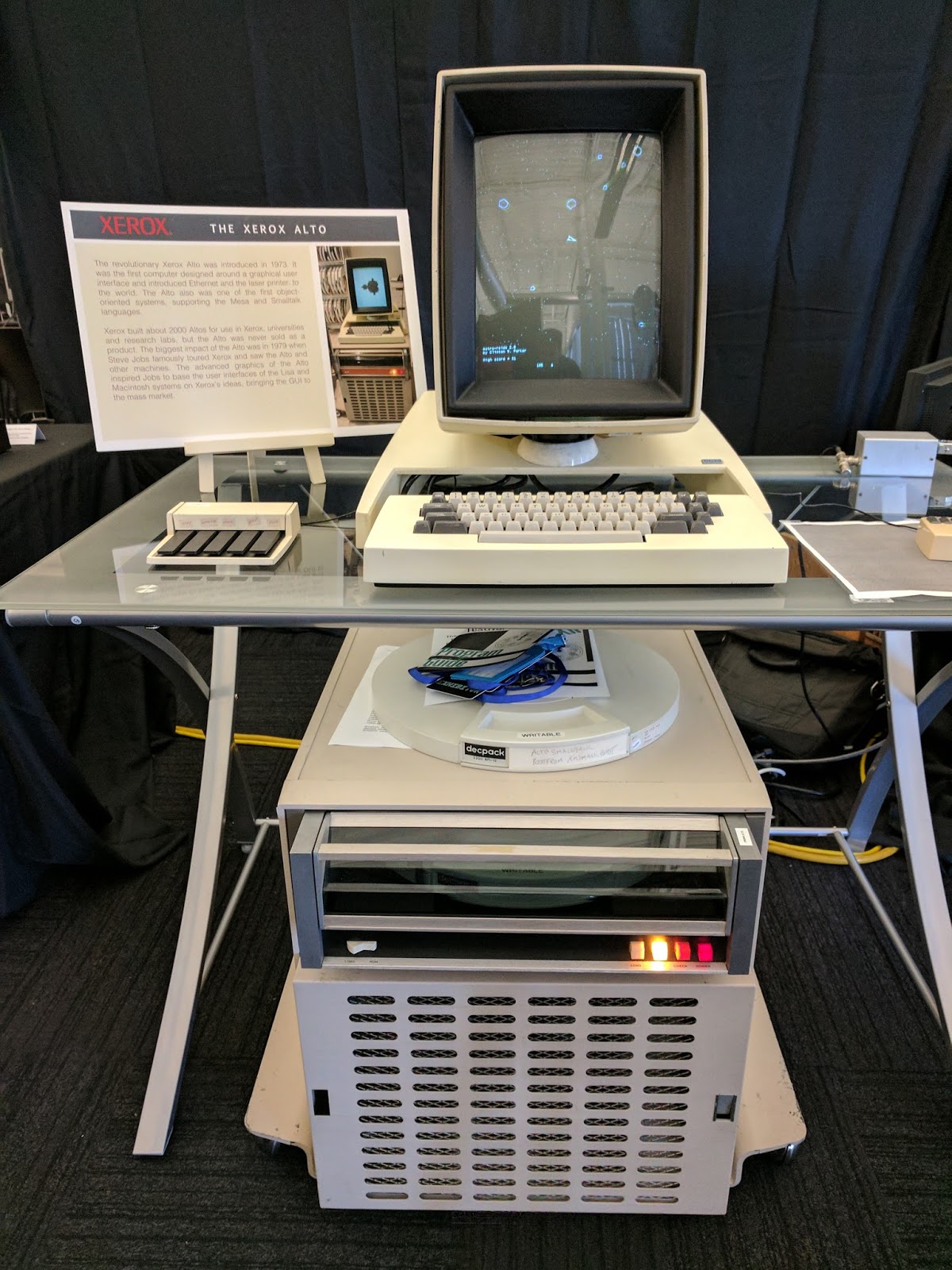
you didn't see a functioning Xerox Alto,
you didn't see SDF's original AT&T 3B2,
you didn't see Bil Herd, Leonard Tramiel and other old Commodore luminaries talking about then and now,
you didn't see a replica "CADET" IBM 1620, "just as it was" in 1959 (the infamous system that used lookup tables for addition rather than a proper adder, hence the acronym's alternative expansion as "Can't Add, Doesn't Even Try"),
you didn't see a JLPGA PowerBook 170 signed by John Sculley,
you didn't see a prototype dual G4 PowerBook,
you didn't see a prototype Mac mini with an iPod dock (and an amusing FAIL sticker),
you didn't see components from the Cray-1 supercomputer,
you didn't see this 6502-based astrology system in the consignment section, of the same model used by Nancy Reagan's astrologer Joan Quigley,
and you didn't see me investigate this Gbike parked out front, possibly against company policy.
You could have, if you had come. But now it's too late. Try again next year.

But what you still have a chance to see is your very own Talos II POWER9 workstation under your desk, because preorders opened today. Now, a reminder: I don't work for Raptor, I don't get any money from Raptor, and I paid retail; I'm just a fairly intransigent PowerPC bigot who is willing to put my Visa card where my mouth is.

Currently on its way to my doorstep is a two-CPU, octocore (each core is SMT-4, so that's 32 threads) Sforza POWER9 Talos II with 32GB of DDR4 ECC RAM, an AMD Radeon Pro WX7100, a 500GB NVMe SSD and an LSI 9300 8-port internal SAS controller. The system comes standard with a case, eight SAS/SATA bays, EATX motherboard, fans for each CPU, dual 1400W redundant PSUs, USB 3.0 and 2.0, RS-232, VGA, Blu-ray optical drive, dual Gigabit Ethernet, five PCIe slots (PCIe 4.0, 3 x16 and 2 x8) and a recovery disc. It runs Linux on ppc64le, which is fully supported. The total cost shipped to my maildrop with a hex driver for the high-speed fan assemblies is $7236.

Now, some of you are hyperventilating by now and a few of you may have gone into frank sticker shock. Before you reach for the Xanax, please remember this is most assuredly not a commodity x86_64 machine; this is a different (and Power ISA successor) architecture with fully auditable firmware, the ability for you to do your own upgrades and service with off-the-shelf parts, and no binary blobs with hidden spies like the Intel Management Engine. This is a niche box for people like us who value alternative architectures, especially in a design that we can build and trust ourselves, and I always said something like this wouldn't come cheap. But let's compare and say you're in the market for a Mac Pro or something. You'll still be paying a lot, especially if you get any of the tasty BTO options, and the next Mac Pro is still months away or more. And if you were actually in the market for an AmigaOne X5000, this blows it out of the water. You could just run UAE on this and have cycles to spare!

When the Talos II arrives, I'll be sure to post some unboxing photos and take it through its paces on first boot and give you some initial impressions. My immediate goal is to get a RAID set up, get QEMU able to run a decent subset of my old Mac software (I'll probably start with OS 9, and then create a Tiger instance or clone the G5 to it), and get Firefox running with compiler settings appropriate to the CPU. Then will come the real fun of writing a JavaScript JIT for POWER9.

But don't worry: the G5 isn't going anywhere and neither is TenFourFox. I've got a lot invested in this Quad and it will still be serving workstation duty for awhile yet. Nevertheless, get your credit card and your intestinal fortitude out in the meantime and reserve a Talos of your own while the pre-order period is open. Time to get in while it's hot. This is the next evolutionary step in personal computing with PowerPC.

As we wind up our discussion of the future, however, one part of the past will soon be almost completely gone: the venerable old <isindex> HTML tag. Firefox will be removing it from 56 for technical reasons after it was already removed from Google Chrome and the Safari preview. This construct dates back to the very earliest days of the Web when early browsers didn't have form support; it was designed as an easy way of enabling the user to send search keywords or parameters to a webserver, much like Gopher servers receive queries over item type 7. Mosaic 1.x even had a little form that was a permanent part of the browser chrome with a search button, as you can see from the screenshot at the Macintosh Repository, which would be activated when the tag was seen. Later on, subsequent versions of Mosaic and most of the successor browsers turned it into a pseudo-form that functioned the same way as far as the server is concerned and some of those sites are still around. Myself I use the tag mostly as a convenience for old browsers and Lynx on the Hytelnet-HTTP gateway; the search system offers both a conventional search form and an <isindex> query, both of which work the same, and both of which can still be seen in 52ESR, 54 and the 55 beta for the time being. It goes without saying that I will not be removing it from TenFourFox, and it will eternally remain in our codebase and on my servers as a relic of the way things were and an echo of the way the early Web was.

Tuesday, July 18, 2017

Talos take II

First, ob-TenFourFox stuff. As the wonderful Dutch progressive rock band Focus plays "Sylvia" in the CD player, I'm typing this in a partially patched up build of FPR2, which has a number of further optimizations including an AltiVec-accelerated memchr() implementation (this improves JavaScript regex matching by about 15 percent, but also beefs up some other parts of the browser which call the same library function) and some additional performance backports ripped off from Mozilla's Quantum project. This version also has a re-tuned G5 build with some tweaked compiler settings to better match the 970 cache line size, picking up some small but measurable improvements on Acid3 and other tests. Even the G3 gets some love: while it obviously can't use the AltiVec memchr(), it now uses a better unrolled character matcher instead and picks up a few percentage points that way. I hope to finish the security patch work by this weekend, though I am still annoyed to note I cannot figure out what's up with issue 72.

Many of you will remember the Raptor Talos, an attempt to bring a big beefy POWER8 to the desktop that sadly did not meet its crowdsource funding goal. Well, I'm gratified to note that Raptor is trying again with a smaller scale system but a bigger CPU: the POWER9-based Talos II. You want a Power-based, free and open non-x86 alternative that can kick Intel's @$$? Then you can get one of these and not have to give up performance or processing (eheheh) power. The systems will use the "scale-out" dual socket POWER9 with DDR4 RAM and while the number of maximum supported cores on Talos II has not yet been announced, I'll just say that POWER9 systems can go up to 24 cores and we'll leave it at that. With five PCIe slots, you can stick a couple cool video cards in there too and rock out. It runs ppc64le Linux, just like the original Talos.

I'm not (just) interested in a thoroughly modern RISC workstation, though: I said before I wanted Talos to be the best way to move forward from the Power Mac, and I mean it. I'm working on tuning up Firefox for POWER8 with optimizations that should carry to POWER9, and once that builds, beefing the browser up further with a new 64-bit Power ISA JavaScript JIT with what we've learned from TenFourFox's 32-bit implementation. I'd also like to optimize QEMU for the purpose of being able to still run instances of OS 9 and PowerPC OS X in emulation at as high performance on the Talos II as possible so you can bring along your legacy applications and software. When pre-orders open up in August -- yes, next month! -- I'm going to be there with my hard-earned pennies and you'll hear about my experiences with it here first.

But don't worry: the G5 is still going to be under my desk for awhile even after the Talos II arrives, and there's still going to be improvements to TenFourFox for the foreseeable future because I'll still be using it personally for the foreseeable future. PowerPC forever.

Saturday, February 4, 2017

An experiment: introducing the PopOutPlayer (plus: microbenchmarking PowerPC SPRs)

TenFourFox 45.8 is coming along -- Operation Short Change (my initiative to rework IonMonkey to properly emit single branch instructions instead of entire branch stanzas when the target is guaranteed to be in range) is smoothing out the browser quite a bit but there are hundreds of places that need to be changed. I've finished the macroassembler and the regular expression engine (and improved both of them in a couple other minor ways), and now I'm working on the Ion code generator. This mostly benefits systems that cannot fit generated code into cache, so while the Quad G5 with its (comparatively large) 1MB per core has only improved somewhere on the order of about 5%, I expect more on low-end systems because hot code is now more likely to stay in the i-cache. I am also planning to put user agent support in 45.8, and there are a few other custodial improvements. The idea is to release that to beta testing around Valentine's Day so I don't have to buy you lot any flowers.

A long while back I mentioned a couple secret projects; one of them was SandboxSafari, and the other was intended as a followup to the now obsolete MacTubes Enabler. That second project got backburnered for awhile, but since I'm noticing changes that may obsolete the work I've done on it as well, I'm going to push it out the door in its current state. Without further ado, let's introduce the PopOutPlayer.

This is not Photoshop. There is, just as you see, a floating video window playing the Vimeo movie that TenFourFox cannot (no built-in H.264 codec). In fact, I think this is the only way you can play Vimeo movies on Tiger now -- neither Safari nor OmniWeb work either.

Yes, it works fine with YouTube also:

Drop the application in your apps folder, drop the PopOutPlayer Enabler addon on TenFourFox, and then on any Vimeo (10.4 only) or YouTube (10.4 or 10.5) page or embedded video, right-click or SHIFT-right-click and select Pop Out Video. The video floats in its own window on top of other windows. You can close the browser tab and go look at something else while the video plays; the playback is a completely independent process. When you open another video, the window pops up in the same location where you left it. On multiprocessor Power Macs it can even get scheduled on another core for even smoother playback.

Sounds great, right? Well, there's a few reasons why I hadn't released this earlier.

First, the app itself is, and I'm actually feeling ill writing this, based on these sites' Flash players. Flash was the only reliable way to do playback and was even more performant than native H.264 in WebKit, and it also had substantially fewer user interface problems at the risk of sometimes being crashy. Flash is no safer now than it was before I condemned it from the browser, but I've learned a few lessons from SandboxSafari, of which the PopOutPlayer is actually a descendant. To remember its window location means we have to run the app with your uid (which eliminates SandboxSafari's primary means of protection), but we also have the advantage of only needing to support at most two specific video player applets, so we can design a very restrictive environment that protects the app from being subverted and rejects running video or Flash applets from other sources.

This different type of sandbox implements other restrictions, most notably preventing the applet from going full-screen. This is necessity reborn as virtue because most of our systems would not do well with full-screen playback, let alone HD (which is also blocked/unsupported), and prevents a subverted player from monkeying with the rest of your screen. The sandbox doesn't let URLs open from the applet either, and has its own Mach exception handler and CGEventTap to filter other possible avenues of exploit. However, that also means that you can't do many of the things you would expect to do if the Flash player were embedded in the browser. That won't change.

The window is fixed-size and floats. Allowing the window to resize caused lots of problems because the applets didn't expect to deal with that possibility. You get one size no matter how big your screen is, and you can only close it or move it.

Although the PopOutPlayer can play more YouTube videos than the QuickTime Enabler, there are still many it cannot play, though at least the Flash player will give you some explanation (the Vevo ones are the most notorious). The PopOutPlayer also isn't intended for generic HTML5 video playback; it doesn't replace the QTE in that sense, and the QTE is still the official video solution in general. The application will reject passing it URLs from other video sites.

The really big limitation, however, is that I could not get the Vimeo applet to run on 10.5 using the hacks I devised for 10.4. Leopard WebKit can play some Vimeo videos, so all is not lost, but no matter what I tried the PopOutPlayer simply wouldn't display any video itself. For the time being, Vimeo URLs on Leopard will generate an "Unsupported video URL" message. It is quite possible this might never be able to be fixed with the current method the PopOutPlayer uses for display, so don't expect it will necessarily be repaired in the future. For that matter, Vimeo on-demand doesn't even work with 10.4.

I consider the PopOutPlayer to be highly experimental, and when (not if) Vimeo and YouTube decommission their Flash players, it will abruptly cease to work without warning. But because I expect that time is coming sooner and not later you are welcome to use the PopOutPlayer for as long as it benefits you, and if I can solve some of these issues I might even make it a supported option in the future -- just don't hold your breath.

Download it here. It is unsupported. Source code is not currently available.

So back to TenFourFox. If you would, permit me now to indulge in some gratuitous nerderosity. Part of Operation Short Change was also to explore whether our branch stanza far calls could be made more efficient. Currently, if the target of a branch instruction exceeds the displacement the branch instruction (i.e., b(l) or bc(l)) can encode, we load the target into a general purpose register (GPR), transfer it to the counter register (a special purpose register, or SPR), and branch to that (i.e., lis/ori/mtctr/b(c)ctr(l)). The PowerPC ISA does not allow directly branching to a GPR or FPR, only to the counter register (CTR) and the link register (LR), which are both SPRs.

This would be all well and good except that the G5 groups instructions together, and IBM warns that there is a substantial execution penalty if mtctr and b(c)ctr(l) are in the same dispatch group. Since mtspr instructions like mtctr must always lead dispatch groups, the above stanza is guaranteed to put them both together (recall instruction dispatch groups are no more than four, or five with a branch, with branches being the last slot). Is it faster to insert nops and accept the code bloat? What about using the link register instead?

It's time for ... assembly language microbenchmarking!

#define REPS 0x4000
_main:
        .globl _main

        mflr r0
        stwu r0, -4(r1)

        li r3,0
        lis r5,REPS
        bl .+4
        ; the location of the following mflr is now in r4
        mflr r4
        addi r4, r4, 8
        ; now r4 points to the addi below

        addi r3,r3,1
        cmp cr0,r3,r5
        beq done
#if USE_LR
        mtlr r4
#if USE_NOPS
        nop
        nop
        nop
        nop
#endif
        blr
#else
        mtctr r4
#if USE_NOPS
        nop
        nop
        nop
        nop
#endif
        bctr
#endif

done:
        lwz r0, 0(r1)
        mtlr r0
        li r3,0
        addi r1, r1, 4
        blr
This just runs a tight loop 1,073,741,824 times, branching to the loop header with either LR or CTR, and with the mtspr instruction separated from the blr/bctr with sufficient nops to put them in separate dispatch groups or not (there must be four to prevent the branch from getting in the terminal branch slot). That gives us four variations to test with a loop so tight the cost of the branch should substantially weigh on total runtime. Let's see what we get. If you're following along on your own Power Mac, compile these like so:
gcc -o lrctr_ctr lrctr.s
gcc -DUSE_NOPS -o lrctr_ctrn lrctr.s
gcc -DUSE_LR -o lrctr_lr lrctr.s
gcc -DUSE_LR -DUSE_NOPS -o lrctr_lrn lrctr.s
If you want to confirm what was actually assembled, you can look at the result with otool -tV.

Our control will be our trusty 1.0GHz iMac G4 (256K L2 cache). There should be no difference between the SPRs, and it all fits into cache and there are no dispatch groups, so if we did this right the runtimes should be nearly identical. In this case we are only interested in the user CPU time (the first field).

luxojr% time ./lrctr_ctr
7.550u 0.077s 0:08.88 85.8%     0+0k 0+2io 0pf+0w
luxojr% time ./lrctr_ctrn
7.550u 0.071s 0:08.55 89.1%     0+0k 0+0io 0pf+0w
luxojr% time ./lrctr_lr
7.550u 0.070s 0:10.08 75.5%     0+0k 0+2io 0pf+0w
luxojr% time ./lrctr_lrn
7.550u 0.069s 0:08.43 90.2%     0+0k 0+0io 0pf+0w
Excellent. Let's run it on the Quad G5 (numbers in reduced performance mode).
bruce% time ./lrctr_ctr
4.298u 0.028s 0:04.33 99.5%     0+0k 0+2io 0pf+0w
bruce% time ./lrctr_ctrn
4.986u 0.035s 0:05.03 99.6%     0+0k 0+2io 0pf+0w
bruce% time ./lrctr_lr
13.755u 0.050s 0:13.82 99.8%    0+0k 0+1io 0pf+0w
bruce% time ./lrctr_lrn
13.752u 0.048s 0:13.82 99.7%    0+0k 0+2io 0pf+0w
Wait, what? Putting mtctr and bctr in the same dispatch group was actually the fastest of these four variations. Not only was using LR slower, it was over three times slower. Even spacing the two CTR instructions apart was marginally worse. Just to see if it was an artifact of throttling, I ran them again in highest performance. Same thing:
bruce% time ./lrctr_ctr
2.149u 0.012s 0:02.16 99.5%     0+0k 0+1io 0pf+0w
bruce% time ./lrctr_ctrn
2.492u 0.010s 0:02.50 100.0%    0+0k 0+0io 0pf+0w
bruce% time ./lrctr_lr
6.876u 0.013s 0:06.89 99.8%     0+0k 0+0io 0pf+0w
bruce% time ./lrctr_lrn
6.874u 0.017s 0:06.89 99.8%     0+0k 0+1io 0pf+0w

I found this so surprising I rewrote it for AIX and put it on my POWER6, which is also dispatch-group based and uses an evolved version of the same instruction pipeline as the POWER4 (from which the G5 is derived). And, well ...

uppsala% time ./lrctr_ctr
3.752u 0.001s 0:04.41 85.0%     0+1k 0+0io 0pf+0w
uppsala% time ./lrctr_ctrn
4.064u 0.001s 0:04.94 82.1%     0+1k 0+0io 0pf+0w
uppsala% time ./lrctr_lr
13.499u 0.001s 0:16.19 83.3%    0+1k 0+0io 0pf+0w
uppsala% time ./lrctr_lrn
13.215u 0.001s 0:15.66 84.3%    0+1k 0+0io 0pf+0w
Execution times should consider that I run this POWER6 throttled in ASMI to reduce power consumption and its microarchitectural differences, but the same relative run times hold. It's actually not faster to space the CTR and branch (that is, if there's nothing better you could be doing -- see below), and the CTR is the best SPR to use for branching on the G5 regardless of any penalty paid. It may well be that using LR fouls the CPU link cache and thus tanks runtime, but whatever the explanation, using it for far calls is clearly the worst option.

Now, as you may have guessed, I've deliberately presented a false choice here because all four of these options are patently pathological. The optimal instruction sequence would be to schedule some work between the mtctr and the bctr. We don't have much work to, uh, work with here, but here's one way.

#define REPS 0x4000
_main:
        .globl _main

        mflr r0
        stwu r0, -4(r1)

        li r3,0
        lis r5,REPS
        bl .+4
        ; the location of the following mflr is now in r4
        mflr r4
        addi r4, r4, 8
        ; now r4 points to the mtctr below

        mtctr r4
        addi r3,r3,1
        cmp cr0,r3,r5
        beq done
        bctr

done:
        lwz r0, 0(r1)
        mtlr r0
        li r3,0
        addi r1, r1, 4
        blr

bruce% gcc -o ctrop ctrop.s
bruce% time ./ctrop
4.299u 0.028s 0:04.34 99.3%     0+0k 0+1io 0pf+0w
Almost identical runtimes (in reduced mode), but the beq takes the branch slot away from the bctr, guaranteeing the SPR operations will be split into two dispatch groups without trying to space them with nops. But inexplicably, if you coalesce the beq/bctr simply into bnectr (which does occupy the same branch slot), you get even faster:
bruce% time ./ctrop2
3.824u 0.039s 0:04.02 95.7%     0+0k 0+0io 0pf+0w
Is this optimal on the G4 and POWER6 as well?
luxojr% time ./ctrop
6.472u 0.064s 0:12.05 54.1%     0+0k 0+2io 0pf+0w
luxojr% time ./ctrop2
6.471u 0.063s 0:09.33 69.9%     0+0k 0+0io 0pf+0w

uppsala% time ./ctrop
3.918u 0.001s 0:04.61 84.8%     0+1k 0+0io 0pf+0w
uppsala% time ./ctrop2
2.612u 0.001s 0:03.09 84.4%     0+1k 0+0io 0pf+0w
Yup, it is, though it's worth noting the G4 did not improve with the bnectr. (This is still pathological, mind you: the best instruction sequence would be simply addi/cmp/bne, which the G5 in reduced mode runs in 2.580u 0.029s and the POWER6 in 1.261u 0.001s, reclaiming its speed crown. But when you have a far call, you don't have a choice.)

The moral of the story? Don't fix what ain't broke.